
|
|
||||||||||
Does A VPN hurt your Internet speed?
Increased security has a trade-off
Keywords:
computer, server, internet, average, destination
Key Takeaway:
You can run some speed tests find out for
yourself.
Category Insights:
INTERNET — This article contains internet related content.
Short Answer
Yes — in most cases, using a VPN will slow down your internet speed.
However, the amount of slowdown depends on your setup, VPN provider, and how you use the internet.
How to Test It Yourself
- Run 2–3 speed tests with your VPN turned on and calculate the average.
- Turn the VPN off and run another 2–3 tests.
- Compare the two averages.
Extra Network Hop
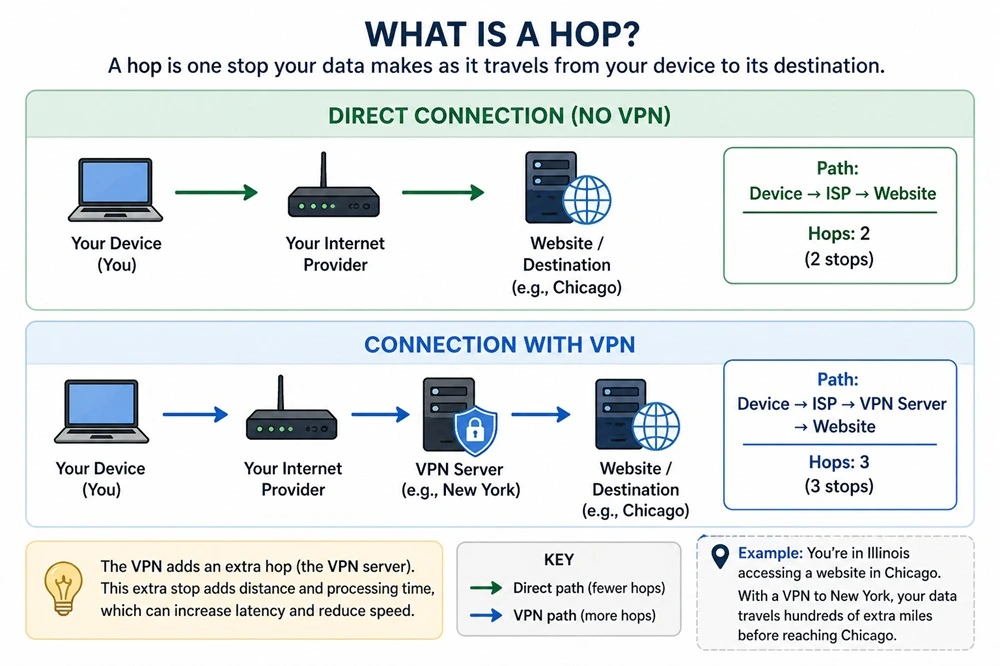
A “hop” is simply one stop your data makes as it travels across the internet
from your device to its destination. Each time your data passes through a router or server,
that counts as a hop. Without a VPN, your traffic might go from your computer → your
internet provider → the website (a few hops total). With a VPN enabled, the path changes to
something like: your computer → your internet provider → the VPN server → the website. That
extra stop adds distance and processing time.
For example, if you’re in Illinois accessing a website hosted in Chicago, the connection is
normally very direct. But if your VPN routes your traffic through a server in New York
first, your data has to travel hundreds of extra miles before reaching Chicago, then make
the return trip—adding delay (latency) and reducing overall speed.
Distance Matters
The farther away the VPN server, the longer it takes for your data to travel. This delay is called latency.
- Nearby server = faster speeds
- Distant server = slower speeds
Latency is the amount of time it takes for your data to travel from your device
to its destination and back again—often called “ping.” It’s measured in milliseconds (ms),
and lower numbers are better. Distance plays a big role in latency because data can only
travel so fast, even over high-speed fiber connections. The farther your data has to go, the
longer it takes to complete the round trip. For example, connecting to a nearby server might
result in a latency of 10–20 ms, while routing your traffic through a VPN server across the
country could increase that to 50–100 ms or more. That extra delay may not matter much for
basic browsing, but it becomes very noticeable in activities like online gaming, video
calls, or anything that requires real-time responsiveness.
Server Load and Quality
VPN speed depends on server performance and how many users are connected. Some VPN's may indicate the workload on each server. It's better to choose one thats has a lighter workload.
- Overloaded servers = slower speeds
- High-quality providers = better performance
Encryption Overhead
VPNs encrypt and decrypt your data, which requires processing power.
- Newer devices handle this easily
- Older devices may experience more slowdown. You may not want to use a VPN with a Celeron or Pentium processor.
VPN Protocols
VPN protocols are the rules and methods your VPN uses to create a secure connection, and they have a direct impact on speed and performance. Some protocols are designed to be lightweight and fast, while others prioritize stronger encryption and reliability, which can slow things down slightly. For example, newer protocols like WireGuard are typically faster and more efficient, while older ones like OpenVPN (especially over TCP) or IPSec can introduce more overhead. Many VPN apps let you switch between protocols, so if you’re experiencing slow speeds, trying a different protocol can often improve performance without sacrificing too much security.
How Much Speed Do You Lose?
- Best case: 5–15% reduction
- Typical: 10–30% reduction
- Worst case: 30–50% or more
When It Matters Most
Online Gaming: Increased latency can cause lag. Turn off the VPN for best performance. Some online games may not allow the use of a VPN.
Streaming & Downloads: May cause buffering or lower quality. Some streaming services may not allow the use of a VPN.
General Browsing: Usually minimal noticeable impact.
How to Reduce Slowdown
- Choose a server close to your location
- Use a high-quality VPN provider. NOTE: Many companies offer VPN services under multiple brand names.
- Try different VPN protocols
- Avoid peak usage times
- Upgrade older hardware if needed
Final Thoughts
A VPN almost always reduces speed somewhat. This is the trade-off for improved privacy and security.
For most users, the slowdown is manageable. For gaming or real-time applications, consider turning the VPN off.