
|
|
||||||||||
How much memory do you need in 2026?
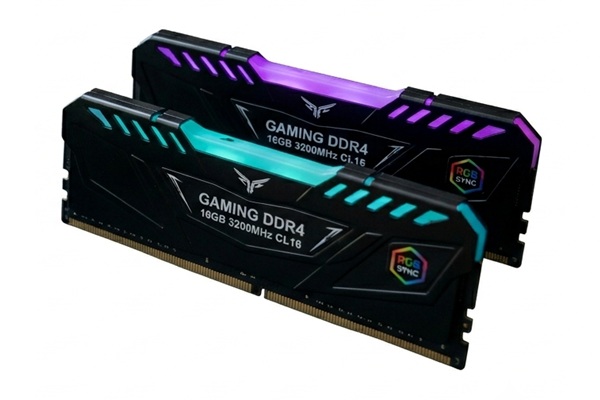
Keywords:
modules, computer, windows, performance, software
Key Takeaway:
How much memory (RAM) you need for your
computer depends on what you plan to
do with it and how much you're willing to spend.
Category Insights:
MEMORY — Faster memory and proper capacity improve overall system
responsiveness.
BUYERS GUIDE — Buyer’s guides help you choose the right hardware and
services.
It Depends!
How much RAM you need in your home or office computer depends largely on what
you plan to do with it and how much you're willing to spend. There are plenty of opinions on
how much memory is enough, but there has always been one common belief: more RAM is
better.
Recently, Microsoft recommended 32 GB of RAM for some Windows 11 systems. That
recommendation came at an interesting time, however, because memory prices have skyrocketed
and RAM has become harder to find. Microsoft has since removed that recommendation from its
website and announced plans to optimize Windows 11 to use memory more efficiently.
Quite frankly, this is something Microsoft and software developers should have been doing
all along. For years, memory was relatively inexpensive and plentiful, so software
developers didn't always have much incentive to make their programs as memory-efficient as
possible. Instead, programs became larger and more resource-hungry because adding more RAM
was an easy and inexpensive solution.
Now that memory prices are rising and supply is tighter, efficient use of RAM has become
important again. It raises an interesting question: How much RAM does your computer really
need?
4Gb of RAM
This is NOT a recommended configuration for Windows 10 or Windows 11
devices.
This small amount of ram only works for Chromebook, Linux, and single board computers such
as a Raspberry Pi that have lower system requirements. Even so, I would consider upgrading
to more memory for better performance.
However, if your a person that still runs outdated versions of Windows such as Windows XP,
Windows Vista, or Windows 7 your performance will be ok, not withstanding the security
vulnerabilities of the older operating system.
8Gb of RAM
This is the bare minimum Microsoft suggests for Windows 10 or Windows 11, but I
wouldn’t recommend it in 2026. As software requirements continue to grow, 8GB might slow you
down, especially when you’re running multiple programs. It’s actually hard to find new
computers with only 8GB of RAM now, but there are still a few older Windows 7 machines that
were upgraded to Windows 10 with 8GB of RAM.
16Gb of RAM
This is what I would choose for any new computer. It's the sweet spot for most
users and is enough to run all games and even a virtual machine (VM). It’s a solid choice
for most people. Most computers sold in stores today will have 16gb. This amount of memory
is perfect for basic home use and office tasks and will run most games.
As of April 2026, Microsoft has made the recommendation that all gaming
computers should have 16gb as a practical starting point and 32gb of RAM for the best
experience.
32Gb of RAM
Now this is perfect for running just about anything and will make
your computer last longer before needing an upgrade. It’s great for people who
use demanding software or run multiple tasks at once.
As of April 2026, Microsoft has made the recommendation that all gaming
computers should have 16gb as a practical starting point and 32gb of RAM for the best
experience.
64Gb of RAM or more
Best for video editing, streaming or engineering applications. With this much
memory, you can easily run multiple VMs and handle heavy, memory intensive workloads. This
is overkill for anyone but the most advanced users.
Ultimately, the more RAM, the better (Well, up to a point) — especially if you want your
computer to last and perform well for years!
Memory is usually installed in pairs
Most modern motherboards have either 2 or 4 slots. It's not uncommon for a
server to have 16 slots. Memory is sold in factory matched pairs. (The memory comes from
the same manufacturing lot). The motherboards and memory are designed to run in dual
channel mode (pairs of memory) for a slight speed increase.
Examples:
4 Gig is likely a single module
8 Gig could be a single module or 2 x 8g modules
16 Gig would be 2 x 8g modules
32 Gig would be 2 x 16g modules OR 4 x 8g modules
64 Gig would be 2 x 16g modules OR 4 x 16g modules
Side notes:
Yes, you can install mixed combinations of sizes and manufacturers, but that’s not
recommended as it hurts performance. The ability to run in dual-channel mode is lost. For
example: Combining a 16 gig pair and a 32 gig pair gives you an odd size of 48.
Yes, you can use a single stick of ram, but that hurts performance. This is
becoming common in lower end Dell, HP. Lenovo and others as a cost cutting measure in the
competitive marketplace. This is not recommended for performance but the computer makers get
away with it as consumers aren't to check.
Yes, you can mix and match memory brands but that also hurts performance as one
brand may be faster than the other. It will default to the slower speed of the two modules.
You also lose out on the dual channel mode.
Today's Recommendations
With memory prices as high as they are today, you may have to compromise unless
money is no object. Instead of buying 64 GB, consider 32 GB. If 32 GB is out of your budget,
16 GB may still be a reasonable choice depending on how you use your computer.
You can also save money by choosing memory with slower timings or less aggressive
specifications. The performance difference may not be noticeable for everyday tasks, making
the lower-cost option a better value.
Ultimately, you may simply have to buy the best memory you can find at a reasonable price.
When RAM is expensive and availability is limited, getting a good deal on adequate memory is
often more important than having the absolute fastest or largest capacity
available.