
|
|
||||||||||
So-called 'Driver Update' software can be harmful
Don't mess with working drivers unless absolutely necessary!
Keywords:
driver, computer, windows, software, printer
Key Takeaway:
You’ve probably heard the phrase "update your
drivers" before.
Category Insights:
BEGINNER — This article is written to be accessible for newcomers to the
topic.
SECURITY — Security best practices include strong passwords, MFA, and regular
patching.
WARNING
You’ve probably heard the phrase "update your drivers" before. I always get
nervous when clients tell me they’ve Updated their drivers just because an email, a program,
or even a person told them to. The truth is, updating drivers like this is often a bad
idea. Most people don’t know what a driver is, what it does, or whether it actually needs to
be updated.
So, what exactly is a driver? A driver is a piece of software that helps your computer’s
hardware (like your keyboard, mouse, printer, monitor, or even your graphics card)
communicate with Windows. Every device connected to your computer and the components within
your computer has its own driver. Examples include the driver for your graphics card, the
driver for your printer, and the driver for your sound card. Without drivers, your computer
wouldn’t know how to use these device properly or at all.
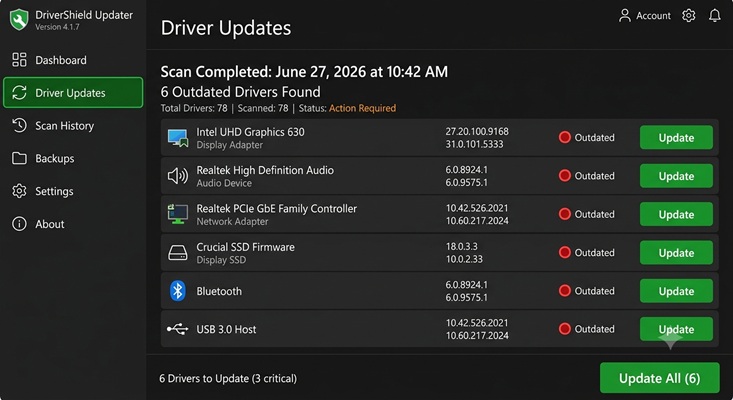
Here’s the thing: many programs that claim to update your drivers are actually dangerous. I
include the Slimware 'DriverUpdate' software shown above in this category. These
drivers can come from anywhere. They could be malware, viruses, or even ransomware. You
might be downloading something that will harm your computer without even realizing it—until
it’s too late.
Likewise, most people don’t know how to choose the right driver. If you pick the wrong one,
it could mess up your whole system and corrupt Windows.
I recommend avoiding installing any driver updates unless your truly having a problem with a
specific device or if you need some new feature that was recently released. So, how do you
get the right driver? In most cases, you can get it directly from the manufacturer’s
website, like Dell or HP. If it’s for a specific device, like a printer or graphics card, go
straight to the maker of that device such as NVIDIA or Logitech. Windows updates usually
include drivers for most common devices, so you don’t always need to look elsewhere. Be
careful with third-party sources—they may not trustworthy, current, or even the wrong one
entirely.
The best rule of thumb? If everything is working fine, don’t mess with your drivers. Leave
things as they are. It's also a great idea to create a system restore point before making
any changes. But if you're having problems, you may wish to ask a professional to help
you.
Amazon Links - These are products we recommend
Meyer Computer is an Amazon Affiliate. We may earn a small commission from qualifying
purchases made through the links below.
Thank you for supporting us!
- Malwarebytes Standard, Premium Security| 18 Months, 2 Devices | PC/Mac
- Malwarebytes Standard, Premium Security | 1 Year, 5 Devices | PC/Mac
- Malwarebytes Standard, Premium Security | 1 Year, 10 Devices | PC/Mac
- Bitdefender Total Security - 3 Devices | 1 year Subscription | PC/Mac
- Bitdefender Total Security - 5 Devices | 1 year Subscription | PC/Mac
- Bitdefender Total Security - 10 Devices | 1 year Subscription | PC/Mac