
|
|
||||||||||
GPU vs. CPU: Why Your Graphics Card Matters More
(Most of the time)
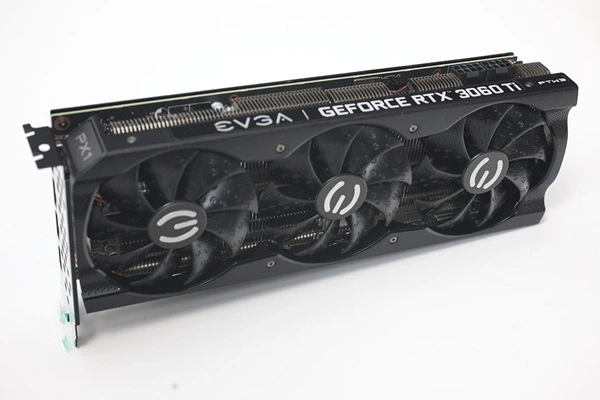
Keywords:
GPU vs CPU, graphics cards, gaming performance, CPU bottlenecks,
GPU architecture, hardware compatibility
Key Takeaway:
When building or upgrading a gaming PC, should you spend more
on the GPU or CPU? Learn how to balance both components,
avoid performance bottlenecks, and get the most from your budget.
Category Insights:
GAMING — Gaming performance depends on GPU, CPU, memory, and display
quality.
Table of Contents
Overview
When building or upgrading a gaming PC, one of the biggest questions is: Should
you prioritize the GPU or the CPU? While both are essential, the
GPU (graphics processing unit) is typically the most important
component for games that depend on high FPS (frames per second).
Why the GPU Matters More for High FPS
The GPU Renders Graphics
Modern games rely heavily on the GPU to process and render images, textures,
lighting, shadows, and effects. A faster GPU can increase FPS and improve gameplay
smoothness—especially at higher resolutions (1440p or 4K).
FPS Is Tied to GPU Power
For graphically demanding games, your FPS is limited by how quickly your
GPU can render frames. A faster graphics card can produce more frames per second, making
gameplay smoother and potentially improving responsiveness. However, CPU performance,
drivers, and game optimization also affect stuttering and input lag.
Higher Resolutions and Settings Depend on the GPU
If you play at 1440p or 4K, the GPU handles much of the graphics workload. Even with a powerful processor, a weaker graphics card can limit FPS, especially when using high graphics settings.
| Reference |
|---|
| #0077 Gaming NVIDIA Graphics Card Numbers Explained: What Do They Mean? |
Games That Benefit Most from a Faster GPU
These games are graphically intensive, meaning a
better GPU directly improves FPS:
Cyberpunk 2077 – High-resolution textures, ray tracing, and dense
environments push the GPU hard.
Red Dead Redemption 2 – Vast open-world rendering requires powerful
graphics processing.
Call of Duty: Warzone – Higher frame rates provide a competitive
edge, especially on high-refresh-rate monitors.
Assassin’s Creed Valhalla – Large open-world areas with detailed
textures and lighting effects demand a strong GPU.
Forza Horizon 5 – High-speed racing at 1440p or 4K requires a
powerful graphics card for smooth gameplay.
If you want high FPS on a 144Hz or 240Hz monitor, investing in a capable graphics card is important. However, your processor must also be fast enough to keep up, especially when targeting very high frame rates.
When Does the CPU Matter More?
While the GPU is crucial for FPS-heavy gaming, the CPU (central
processing unit) still plays a role—especially in games that rely on fast
calculations, AI, and physics.
Games That Benefit More from a Faster CPU
These games are more CPU-intensive and rely on fast processing rather than
raw graphics power:
Counter-Strike 2 & Valorant – These competitive games benefit from high
frame rates and fast CPU performance, particularly when targeting very high FPS.
Microsoft Flight Simulator – Simulates real-world physics and
weather, which taxes the CPU.
Cities: Skylines – Large-scale city building depends on CPU power
for AI, pathfinding, and economy simulation.
StarCraft II & Total War Series – Strategy games with large armies
need fast CPU processing for AI decision-making.
MMOs (Final Fantasy XIV, World of Warcraft) – CPU handles player
interactions, world updates, and large-scale battles.
If you play these types of games, you’ll still need a good GPU, but a
high-performance CPU will make a noticeable difference.
Comparing Popular GPU Architectures
Not all graphics cards are built the same way. NVIDIA, AMD, and Intel use different GPU
architectures, which determine how their graphics cards process games, handle special
effects, and support newer technologies.
You may see architecture names such as NVIDIA Blackwell, AMD RDNA, and Intel Xe. These are
the underlying designs used to build different generations of graphics cards. Newer
does not automatically mean better for every buyer. Price, performance, memory,
and the games you play are equally important.
| Manufacturer | Popular Architecture | Advantages | Potential Drawbacks |
|---|---|---|---|
| NVIDIA |
Blackwell (RTX 50 Series) Ada Lovelace (RTX 40 Series) |
Strong gaming performance, advanced ray tracing, DLSS upscaling, and extensive software support. Also popular for AI applications and creative workloads. | Some models carry a higher price. Features and performance vary considerably between models. |
| AMD |
RDNA 4 (RX 9000 Series) RDNA 3 (RX 7000 Series) |
Competitive traditional gaming performance, strong value in selected price ranges, and support for modern gaming technologies. | Ray tracing performance and software features can vary compared with competing NVIDIA products. |
| Intel | Xe / Xe2 (Arc Graphics) | An additional graphics card option, competitive features in selected models, and continued development of gaming graphics technology. | Smaller selection of graphics cards and a less established gaming ecosystem. Performance and game compatibility should be checked before purchasing. |
Does the GPU Architecture Really Matter?
Yes, but the architecture name alone does not tell you how fast a graphics card will be. A
newer entry-level graphics card may be slower than an older high-end model.
Different manufacturers also offer technologies that improve gaming performance. NVIDIA has
DLSS, AMD has FSR, and Intel has XeSS. These technologies can improve frame rates by
rendering and processing images in different ways.
When comparing graphics cards, look at actual gaming benchmarks, available video memory
(VRAM), power requirements, and the features supported by the games you play. Don't purchase
a graphics card based on its architecture name alone.
CPU Bottlenecks and How to Avoid Them
A CPU bottleneck happens when your processor cannot keep up with the
graphics card. The GPU may be capable of rendering more frames, but it has to wait for the
CPU to finish its work.
This can limit your FPS, cause inconsistent frame rates, and prevent you from getting the
full performance out of your graphics card.
What Causes a CPU Bottleneck?
Several things can contribute to a CPU bottleneck:
1. An Older or Slower Processor
An older CPU may struggle to keep up with a newer, more powerful graphics card, especially
in games that depend heavily on processor performance.
2. Playing at Lower Resolutions
At 1080p, a powerful GPU can render frames very quickly. This places more pressure on the
CPU to keep up. At 1440p and 4K, the graphics card generally has more work to do, which can
shift the workload toward the GPU.
3. CPU-Intensive Games
Simulation games, strategy games, and games with large numbers of players or objects can
require substantial processor performance.
4. Background Programs
Running several programs, browser tabs, recording software, or other applications while
gaming can consume CPU resources and affect performance.
How Can You Avoid a CPU Bottleneck?
You don't necessarily need the most expensive processor available. The goal is to choose a
CPU that can keep up with your graphics card and the games you play.
Here are a few things to consider:
• Match your CPU and GPU to your gaming resolution and performance goals.
• Avoid pairing a very powerful graphics card with an outdated processor.
• Close unnecessary background applications when gaming.
• Check gaming benchmarks for the CPU and GPU combination you are considering.
• Upgrade the processor if it consistently limits performance in the games you play.
Remember: Some games are limited by the GPU, while others are limited by
the CPU. There is no single CPU and GPU combination that is perfect for every game.
How to Balance GPU and CPU for Gaming
If Your Budget is Limited:
• Prioritize the GPU if gaming performance and graphics quality are your
main goals.
• Choose a capable mid-range CPU rather than spending too much on the processor.
• Make sure you have enough memory and storage for your games.
For Competitive or Esports Gamers:
• A fast CPU can be just as important as the GPU when trying to achieve very high FPS.
• Consider a processor that performs well in games that depend heavily on CPU speed.
• Match your hardware to your monitor's refresh rate.
For a Balanced Gaming PC:
• Spend more on the GPU when playing graphically demanding games at 1440p or 4K.
• Select a CPU that can keep up with your graphics card without unnecessarily increasing
your budget.
• Leave room in your budget for a suitable power supply, motherboard, memory, and cooling.
For High-End 4K Gaming:
• Invest in a powerful GPU because 4K gaming places a significant workload on the graphics
card.
• A good mid-range or high-end CPU is generally sufficient for many 4K gaming systems.
• Don't spend your entire budget on the graphics card while overlooking the other
components.
Don't Forget Hardware Compatibility
Before purchasing a new graphics card or processor, check that your existing hardware
supports the upgrade.
For graphics cards, check the available PCIe slot, power supply wattage and connectors, and
the physical space inside your computer case. Some larger graphics cards may not fit in
smaller cases.
For processors, check motherboard compatibility, including the CPU socket and supported
processor list. Some upgrades may also require a BIOS update.
A little research before purchasing can prevent expensive compatibility problems.
Final Verdict: GPU Wins for High FPS
For most modern games, especially AAA titles and graphically demanding
shooters, the GPU is often the most important component for achieving high FPS.
However, an underpowered CPU can also limit performance, particularly in games that depend
heavily on processor speed.
However, if you play strategy games, simulators, or esports titles, a strong CPU
also plays a critical role.
The key takeaway? Invest more in the GPU for smooth
high-FPS gaming, but don’t completely ignore the CPU—especially if you play CPU-heavy
games.
Frequently Asked Questions
Is the GPU or CPU more important for gaming?
For most modern games, the GPU has the biggest impact on gaming performance and graphics
quality. However, the CPU is also important, especially in games that rely heavily on
calculations, physics, and AI.
What does FPS mean in gaming?
FPS stands for Frames Per Second. A higher FPS generally produces smoother gameplay and can
improve responsiveness in fast-paced games.
Can a CPU bottleneck a graphics card?
Yes. If the processor cannot keep up with the graphics card, it can limit performance and
prevent the GPU from reaching its full potential.
When is a faster CPU more important than a GPU?
A faster CPU becomes more important in simulation, strategy, and esports games that rely
heavily on AI, physics calculations, or processing large numbers of objects and players.
Do I need a high-end CPU for 4K gaming?
Not usually. At 4K resolution, most of the graphics workload is handled by the GPU. A
capable processor is still necessary, but spending more on the graphics card often provides
a greater improvement.
What is a good CPU and GPU combination for gaming?
A balanced system pairs a capable processor with a graphics card that matches your gaming
goals and monitor resolution. Avoid spending excessively on one component while neglecting
the other.
Does a faster GPU improve gaming at 1080p?
Yes. A faster graphics card can increase frame rates at 1080p, but the CPU may become a
limiting factor when targeting very high FPS.
How much of my gaming PC budget should go toward the GPU?
For most gaming-focused builds, the GPU deserves the largest share of the budget. However,
there is no fixed percentage that works for everyone. Your games, resolution, processor
requirements, and overall budget should determine how much you spend.
Should I upgrade my GPU or CPU first?
If your games are limited by graphics performance, upgrade the GPU first. If your processor
is holding back an otherwise capable graphics card, a CPU upgrade may make more sense. Check
gaming performance and system usage before deciding.
Is NVIDIA better than AMD or Intel graphics cards?
Not necessarily. NVIDIA, AMD, and Intel all offer different graphics cards with their own
advantages. Compare actual gaming performance, price, memory, software features, and power
requirements before choosing.
How much VRAM do I need for gaming?
VRAM is the dedicated memory on a graphics card used to store textures and other graphics
data. The amount you need depends on the games you play, resolution, and graphics settings.
Newer games and higher resolutions generally benefit from more VRAM.
Will any graphics card work with my motherboard?
Most modern desktop graphics cards use a PCIe slot, but you should still check motherboard
compatibility, available space inside the case, and power supply requirements before
purchasing.
Can I install a faster CPU without changing my motherboard?
Sometimes. The processor must be compatible with your motherboard's CPU socket and supported
by its BIOS. Check the motherboard manufacturer's CPU support list before purchasing a
replacement processor.
Amazon Links - These are products we recommend
Meyer Computer is an Amazon Affiliate. We may earn a small commission from qualifying purchases made through the links below.Thank you for supporting us!
- Logitech G305 Lightspeed Wireless Gaming Mouse - White
- Logitech G305 Lightspeed Wireless Gaming Mouse - Blue
- Logitech G305 Lightspeed Wireless Gaming Mouse - Black
- be quiet! Dark Perk Sym PC Gaming Mouse, 55g Lightweight, 32,000 DPI - Symmetrical
- be quiet! Dark Perk Sym PC Gaming Mouse, 55g Lightweight, 32,000 DPI - Ergonomic
- Keychron K10 Full Size 104 Keys Bluetooth Wireless Mechanical Gaming Keyboard
- NZXT Function - Full Size Mechanical Keyboard - Black
- Keychron K10 Max QMK Wireless Custom Mechanical Full-Size Keyboard
- XBOX Wireless Gaming Controller | Carbon Black | Consoles, PCs, TVs, & mobile
- Lifelong Office Chair Wheels - Black
- Lifelong Office Chair Wheels - RGB
- X-Protector GPU Support Bracket