
|
|
||||||||||
CUTTING THE CORD - We installed fiber internet!
Ditch expensive cable now!
Keywords:
fiber, service, internet, installers, equipment
Key Takeaway:
After years of rising prices, forced channel
bundles, and frustrating
customer service from Comcast / Xfinity, we finally decided we’d had enough.
Category Insights:
INTERNET — This article contains internet related content.
Why we Switched to Fiber
After years of rising prices, forced channel bundles, and frustrating
customer service from Comcast / Xfinity, we finally decided we’d had enough. We were
paying for channels we never watched, and a large portion of the bill was made up of
fees and taxes. Meanwhile, Comcast has been losing customers by the thousands and raising
prices on the ones who remain.
When fiber internet finally became available in our neighborhood, we decided to make the
switch.
If you have the opportunity to switch to fiber — do it.
November 14 – Finally Ordering Fiber
We had wanted fiber internet for a long time. Surf had installed service
throughout much of our town the year before, but they completely skipped all around our
subdivision. Then one day, installers showed up and began running the main trunk line down
our road.
When they reached the stop sign at the intersection, I called Surf and requested
service.
For us, it was a toss-up between 1 Gig and 2 Gig service. In the end, I chose 2 Gig because
Surf was offering a lifetime price lock and the price difference was minimal. If Surf ever
discontinues that offer, I didn’t want to regret choosing the lower speed. My internal home
network already runs at 2.5 Gig speeds, so 2 Gig service made perfect sense.
The goal was simple: replace overpriced, unreliable Comcast Xfinity service as soon as
possible.
November 18 & 24 - Neighborhood Distribution Line Work

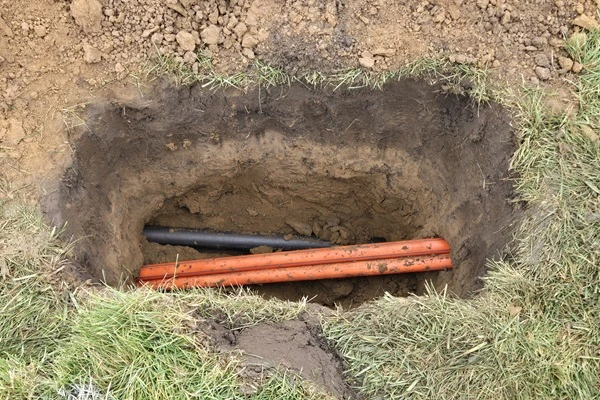
Over the next couple of weeks, installers were active all along our road. They
worked in our yard on two different days. All underground utilities had been pre-marked. We
had flags labeled “BrightSpeed” marking fiber placement areas along with flags for the gas
and electric service.
Crews worked in unmarked white trucks throughout the neighborhood. At one point, they nearly
hit a buried Nicor gas line in our yard. (see photo above.) This was not the installers’
fault. I was told by a worker that the line had been marked incorrectly by USIC. Thankfully,
they were careful and avoided damage. There were no serious issues.
When the digging was complete, the yard was restored properly. You can still see signs of
activity and equipment tracks. By spring it should look like the installers were never
there.
As of this writing, Surf has completed installation on our road only. The other 30+ homes in
the subdivision are still waiting, but I assume Surf will continue expanding at some
point.
December 31, Hookup Day & Equipment
Hookup day went smoothly.
Our next-door neighbor has a fiber junction box at the front edge of his property. On
installation day, the crew opened that box and ran a line to the side of our
house.
Because the ground was frozen, the fiber line was temporarily left above ground until spring
burial. There were no issues with the exposed line.
Inside the house, the installer was excellent — knowledgeable, professional, and spoke clear
English. I requested that the fiber be routed to the same central location where our old
cable modem had been installed. He accommodated that without hesitation.
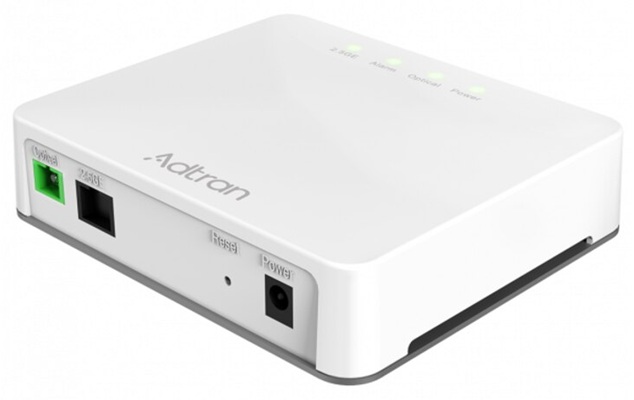
Surf uses Adtran fiber modems. Adtran is a well-respected networking company in the IT
industry, not generic equipment. The modem installed was a 2.5G unit, which fit perfectly
with my network setup.
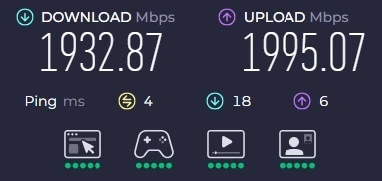
Once connected, my existing Wi-Fi network detected the connection immediately. The installer
tested speeds on his handheld device, and I ran my own Speedtest by Ookla on my
laptop and from my desktop (see below).
The results were outstanding:
We now have symmetrical download and upload speeds with a 4ms ping time. This is the fastest
Internet connection I’ve ever experienced in a home setting.
Wi-Fi Equipment Choice
Eero Wi-Fi Router
The Eero system provided by Surf is an Amazon product. Amazon is widely known
for data collection through products like Alexa, Ring, and Blink. Many IT professionals
prefer more control over their networking hardware, and I’m no exception.
My second complaint with the Eero system is that its purposely designed in such a way as to
prevent a user to manually select channels (radio frequency). This limitation is mentioned
in many Eero reviews. If you live in s a neighborhood where everyone has the Surf + Eero
combination, the Eero devices are all on the same channel which is undesirable. This isn't a
problem if your in an uncongested area. Every location is different.
Bring your own Wi-Fi Router
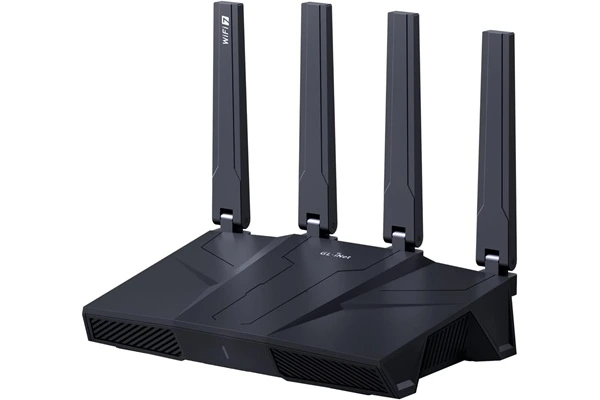
A couple of months before the install, I had already upgraded to a
GL.iNet Flint 3 Wi-Fi 7 router. Because of that, I declined the Eero
equipment Surf was offering.
The Flint 3 paired seamlessly with the new fiber connection. One of the features that I like
about this router is that you can configure your VPN software directly on the router. This
allows every device on your home network to be protected by the VPN.
First Week of Service
During the transition, I ran 24/7 internet monitoring software to log any
outage. During the first week, there were several service interruptions. Installers were
still working in the area, so it was understandable.
One evening, service was down for about four hours after 9pm. Another day, it was down for
roughly an hour. We also had a pair short outages.
After that first week, there have been no recorded issues. The surf system does appear to do
a system check automatically or reset every morning somewhere between 3 AM and 4 AM, and
typically takes a couple of minutes. This is planned and normal. Its not an issue for most
customers.
February 16 – Line Burial
At 7:40am one morning, a contractor arrived to bury the fiber line. I had worked
late the night before, so the equipment noise woke me up.
Although they apparently knocked, they did not ring the video doorbell, and I received no
notification. I went outside to speak with the worker.
What concerned me most was that the yard had NOT been marked with pink utility flags
beforehand. Surf had previously said we would be notified so we could call someone to have
that done. There are multiple utilities buried in that same area. Fortunately, nothing was
hit, and the yard was left in good condition. The workers pulled up all the marker
flags for all the homes on the road.
There were no incident but better communication would have prevented a possible mishap. At
this point I'm assuming the installation is complete.
February 20 – Confusion
I looked outside. USIC had showed up and remarked the entire yard and the
nextdoor neighbors yard. But why? The fiber installers had completed work and were no longer
in the area. The main distribution line is buried and the lines to the homes are buried.
There is nothing left. I think someone at USIC is confused.
Pricing: The Real Game Changer
This is where the real difference shows. Our new bill is $95 per month for 2 Gig
fiber internet.
Previously, our Comcast Xfinity bill which included internet and TV, had climbed to just
over $300. After adjustments, we called and got it down to $270 which was still far too
high. A large portion of that total was fees and taxes. Comcast didn't have any local
competition and could get away with higher prices.
Surf has changed the game. By switching to Surf, our bill was reduced by $175 per month! We
now use part of the savings for streaming services and we'll still come out ahead — with the
bonus of twice the internet speed.
Currently, there are no additional fees or hidden taxes on the Surf bill. That may change in
the future — this is Illinois, after all — but for now, pricing is straightforward.
Final Thoughts
The switch to fiber has been a smart move.
Aside from minor communication issues and the short service interruptions during the first
week when they were still working in the neighborhood, everything has gone well. After two
months, the connection remains fast and reliable.
Surf Fiber Rating: 8/10
Points deducted for early outages, utility marking, and lack of notification for the line
burial in the yard.
Eero Wireless Rating: 6/10
While the system works, it lacks some basic features that other routers have as
standard.
Comcast Xfinity Rating: 4/10
Speed was acceptable, but pricing, reliability, and customer service were
disappointing.
If fiber is available in your area, it’s worth serious consideration. For us, cutting the
cord has meant lower bills, faster speeds, and fewer headaches.
Amazon Links - These are products we recommend
Meyer Computer is an Amazon Affiliate. We may earn a small commission from qualifying
purchases made through the links below.
Thank you for supporting us!