
|
|
||||||||||
Stop Using That Cheap Keyboard: Get a Real Keyboard
Keywords:
keyboard, mechanical, ergonomic, wired, wireless
Key Takeaway:
If you spend a lot of time typing, there is
no reason to settle for a cheap keyboard. A better keyboard can be more
comfortable, more responsive, and more enjoyable to use.
Category Insights:
BEGINNER — This article is written to be accessible for newcomers to the
topic.
Does your keyboard make the grade?
The keyboard that came with your HP, Dell, Lenovo, or other desktop computer probably gets the job done. But there is a good chance it was designed to keep the cost of the computer as low as possible, not to provide the best typing experience.
If you spend a lot of time typing, there is no reason to settle for a cheap keyboard. A better keyboard can be more comfortable, more responsive, and more enjoyable to use. Think of it as an upgrade you interact with every time you sit down at your computer.
Why Buy a Better Keyboard?
For someone who only types a few emails or occasionally searches the web, the keyboard that came with the computer may be perfectly adequate. However, people who type for hours every day, work from home, write documents, program, or play PC games may notice a big difference with a quality keyboard.
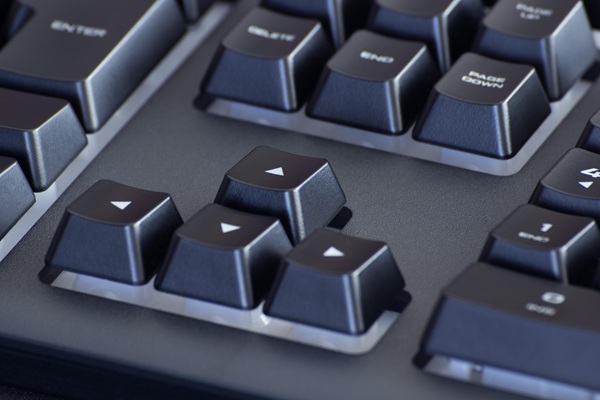
Mechanical keyboards are especially popular with people who type a lot and with gamers. Instead of using a simple rubber membrane like many inexpensive keyboards, mechanical keyboards use individual switches underneath each key. These switches can provide a more consistent and responsive feel.
A good mechanical keyboard can also last for years. Some models allow you to replace individual switches or keycaps, so you don't necessarily have to replace the entire keyboard if a key wears out or you simply want to change its appearance.
Mechanical Keyboard Switches Make a Difference
Mechanical keyboards are available with different types of switches. You will often see switches described by colors such as red, brown, or blue, although the exact characteristics depend on the manufacturer.
Red switches are generally smooth and require relatively little force, making them popular with gamers. Brown switches provide some tactile feedback without being as loud as many traditional clicky switches. Blue switches are known for their noticeable tactile bump and clicking sound.
There is no single "best" switch. The right choice depends on how you type, how much noise you can tolerate, and what feels comfortable to you. If possible, try a few different types before spending a lot of money on a keyboard.
Ergonomic Keyboards
Ergonomic keyboards are another option, particularly for people who spend many hours typing. Their unusual shapes are designed to place your hands and wrists in a more natural position.
Some people absolutely love ergonomic keyboards. Others can't stand them. I fall into the second category. After using a standard keyboard for so many years, an ergonomic keyboard feels completely wrong to me. That doesn't mean ergonomic keyboards are bad. It simply shows that keyboard comfort is very personal.
If you are considering an ergonomic keyboard, give yourself some time to get used to it. The first few days may feel strange because your hands have learned the layout of a traditional keyboard.
Full-Size, TKL and Compact Keyboards
Keyboard size is another decision you will need to make.
A full-size keyboard includes the number pad along with the standard keys. If you frequently enter numbers, work with spreadsheets, or use accounting software, the number pad can be very useful.
A TKL, or tenkeyless, keyboard removes the number pad. This gives you a smaller keyboard while keeping the function keys, arrow keys, and other familiar controls.
There are also compact keyboards, including 75% and smaller layouts. These keyboards remove some keys or combine functions to save desk space. A smaller keyboard can also leave more room for your mouse, which can be important for gamers.
Some keyboards include dedicated volume controls, media buttons, programmable keys, or a convenient control knob. These features can be useful if you regularly adjust your volume or perform repetitive tasks.
Backlighting and RGB
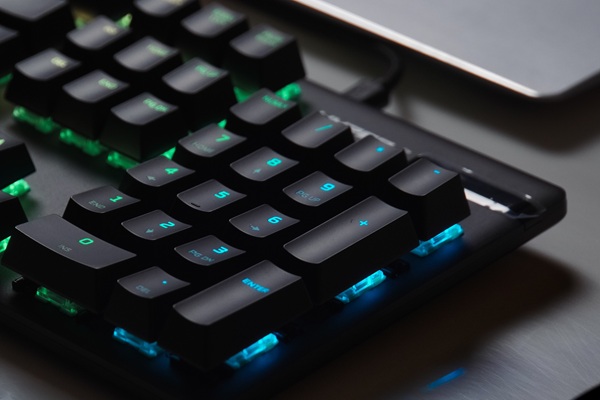
Backlighting can make a keyboard easier to use in a dark room. Some keyboards simply illuminate the keys with a single color, while gaming keyboards often include RGB lighting with millions of possible color combinations and effects.
RGB lighting isn't going to make you type faster, but some people enjoy it. Gamers in particular often like being able to match their keyboard lighting to the rest of their computer setup.
If you don't care about flashy lighting, don't pay extra for it. A good keyboard without RGB can still provide an excellent typing experience.
Replaceable Switches and Keycaps
One of the interesting things about modern mechanical keyboards is how customizable they can be.
Some keyboards use hot-swappable switches. This means you can remove a switch and replace it without soldering. You can experiment with different switches until you find a feel you like.
Keycaps can also be replaced. There is a huge market for custom keycaps in different colors, materials, shapes, and designs. Some people collect them simply because they enjoy building a keyboard that looks and feels different from anything else.
For some keyboard enthusiasts, customizing the keyboard becomes a hobby of its own.
Wired or Wireless?
You will also need to decide whether you want a wired or wireless keyboard.
A wireless keyboard gives you more freedom. You can move farther away from the computer without dealing with a cable. This can be particularly useful when giving a presentation, controlling a computer connected to a television, or simply keeping your desk free of cables.
The downside is that wireless keyboards need power. Depending on the model, you will need to recharge the built-in battery or replace batteries periodically. You also have another device to remember to charge.
A wired keyboard doesn't have that problem. Plug it in and it works. There is no battery to charge and no wireless connection to worry about. For a desktop computer that stays in one place, a wired keyboard is often the simplest choice.
Modern wireless keyboards can perform very well, so speed is generally not a reason by itself to avoid wireless. For most people, the decision comes down to convenience and personal preference.
You Don't Have to Spend a Fortune
Buying a better keyboard doesn't necessarily mean spending hundreds of dollars. There are plenty of reasonably priced mechanical keyboards that offer a major improvement over the inexpensive keyboard included with many desktop computers.
The important thing is to consider how you actually use your computer. If you type several hours a day, spending a little more on a keyboard you enjoy using can be money well spent.
A keyboard is one of the few computer accessories you physically interact with almost every minute you are working at the computer. If the keyboard feels cheap, uncomfortable, or frustrating, upgrading it can make a surprisingly big difference.
So take a look at the keyboard sitting in front of you. If it was the one that came in the box with your computer and you spend a lot of time typing, maybe it's time to use a real keyboard.
Amazon Links - These are products we recommend
Meyer Computer is an Amazon Affiliate. We may earn a small commission from qualifying
purchases made through the links below.
Thank you for supporting us!