
Eufy Security Review
Low-cost home surveillance system
Finding the Right Camera System
My foremost requirement was a security camera system that doesn’t require a
monthly subscription. Systems like Ring and other cloud-based options require a
monthly fee that continues indefinitely. It also needed to be wireless, since
running cables wasn’t practical for my setup. I have no way of running cables for Ethernet
connectivity in the places where I wanted cameras except for one. Affordability and easy
installation were also key factors. This combination of requirements severely limits a persons
options. After researching on Google and YouTube, I settled on Eufy. I decided to start with a
single doorbell camera and I can add more cameras as needed.
Home Base V2
The first thing to set up is the home base, which stores video recordings and
connects to your home Wi-Fi. Inside the box, you’ll find the base unit and a power cord — that’s
it. Place the base unit in a location central to your other Eufy devices so they can communicate
more effectively.
Setup is simple. Just download the Eufy app, create a free account, and follow the step-by-step
instructions to connect the base unit to your Wi-Fi network or Ethernet. Once that’s done, you
can start adding your cameras. Easy!
Roughly a month after I made my initial purchase; Eufy introduced the new V3. That's the way my
luck goes. Had I known, I would have waited and gone with the V3. Eufy does offer upgrade
options periodically. I am still using the V2 at this time as I would need to spend more money
to upgrade.
S220 Doorbell Review
The box includes the S220 doorbell, charging cord, access key, mounting bracket, and
screws. First, you’ll need to charge the doorbell using the supplied cable, which takes a few
hours. Once charged, open the Eufy app to add the device to your account — the base unit will
detect it automatically.
From there, you can adjust settings like video length, motion sensitivity, and night mode. Be
aware that some settings can drain the battery faster. Finally, mount the doorbell using just
two screws. When motion is detected, you’ll receive a notification and can watch the video on
your phone. Doorbell videos are stored on the base unit, with storage capacity depending on
video length and quality.
Eufy has both a S220 Doorbell and a S220 Solocam. The duplication of product numbers leads to confusion.
Pros & Cons
Removing the doorbell to access and recharge the battery can be tricky. The access
pinhole is located at the bottom, making it hard to find—especially in cold weather.
I did encounter a problem after about a year—the blue ring light around the button stopped
working, though it still lit up while charging. Removing it from the app and re-adding didn’t
cure the problem. Eufy’s tech support wasn’t much help and only suggested solutions I had
already tried.
Everything else worked fine, so I moved the S220 to my garage entry door to monitor activity
when the garage door is left open. Once inside the garage, the battery life improved to about
four months since it’s sheltered from the elements. Eventually the blue ring light magically
started working again. I have never been able to figure out why it quit in the first place. I
replaced the front doorbell camera with the newer E340 model.
Battery issue with the S220 Doorbell
Eufy claims a battery life of up to 6 months but that essentially requires all
features be turned off. Actual Battery life is around one month in winter and perhaps three
months in summer.
After using this doorbell for several months, I began having concerns with the battery life. I
charged it fully for the first 2-3 times it would last about 3 months. The second time I charged
it, the battery lasted about 3 weeks. The third time it only lasted 3 days. This is
terrible.
I contacted tech support via email and received a very fast reply. The support person advised me
to try different settings. They advised to ONLY use the V2 base as the charger. I had already
done these on my own, but I double checked everything just to confirm. This did not make a
difference. My solution was to use a different charger. I purchased a UGreen USB charger from
Amazon and left it charge the doorbell for at least 24 hours. Once complete I was back to a 3
month battery life. I now use the UGreen charger for the doorbell and my cellphones as it gives
a better result.
Overall Impressions
Eufy’s 2k video quality is quite good. The lighting in the area being captured can
make a big difference. Like any camera, bright sunlight tends to give the best results, while
low light can cause graininess. The night vision is decent but not great. It’s sufficient for
general monitoring but may not capture fine details in the dark.
The doorbell doing a good job of capturing faces assuming people turn towards it. I did find
that some people will purposely avoid the camera. They don't realize they may be captured by
multiple devices.
I had to lower the motion sensitivity to prevent excessive alerts—on the first day, it triggered
over 700 times! Mowing the lawn also sets it off repeatedly as you go back and forth in your
yard.
A tree in front of the doorbell camera sometimes triggers false alerts on windy days, which can
be annoying. Otherwise, it performs well. Each user’s setup will require some fine-tuning for
the best results. It does have it's issues and no setup will be perfect in every
situation.
E340 Doorbell Review
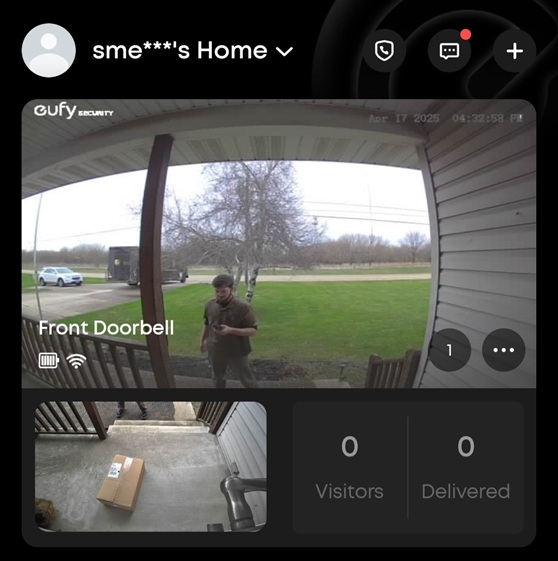
This newer model features a second camera for package detection and an LED light.
The box contains the doorbell, charging cord, access key, mounting bracket, and screws. Like the
previous model, it requires an initial charge via USB-C, which takes a few hours.
Setup is nearly identical to the S220, with step-by-step voice prompts in the app. Once
installed, it records motion-triggered videos that you can access on your phone. The new package
camera is great for online shoppers, letting you check for deliveries or capture footage if a
package is stolen.
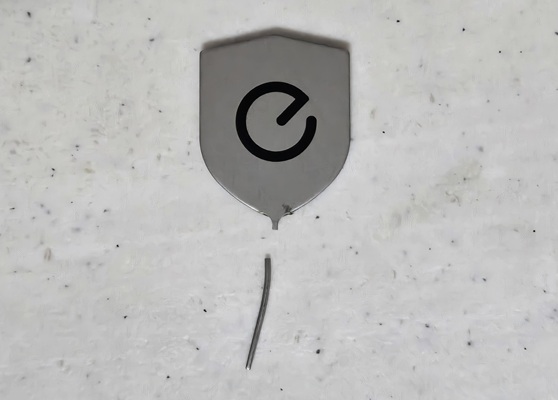
One of the downsides of the E340 is that the access key is fragile and tends to break. It constantly wants to bend and then I need to straighten it out. Then it will bend again the with t next use. About 3-4 uses it breaks completely. I purchased a set of 3 replacements from a Chinese seller on Amazon and they were only marginally better than the original. I have broken one of those as well.
Significant Improvements Over the S220 Doorbell
- The access key pinhole is now at the top, making battery removal easier (minus the key issue).
- The battery is removable and allows for a quick swap with a second battery.
- The mounting bracket is larger but uses the same holes as the S220, so no additional drilling was needed.
On the downside - The E340 camera battery is much better than the S220 but still
isn't great. I tried to get a spare so I could swap them out, but they are out of stock
everywhere. The best route is to used your homes existing doorbell wiring. I Unfortunately my
home isn't wired for it and there is no easy way of running a wire. My only solutions is to put
up with the battery.
S220 SoloCam Review
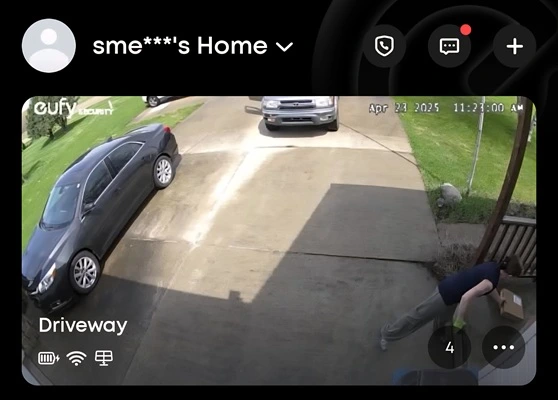
I initially chose this camera because it has a built-in solar panel. Setup was
straightforward: after charging the unit with a USB-C cable, I added it to the Eufy app like the
doorbells. Then, I mounted it with two screws within Wi-Fi range.
A big advantage of the SoloCam is that it connects to standard 2.4GHz Wi-Fi, allowing for
greater range and compatibility with Wi-Fi extenders. However, my camera is just far enough from
the router that it sometimes struggles with high latency. I may install a range extender to fix
this issue.
The SoloCam stores videos locally, overwriting old recordings when storage is full. The built-in
solar panel keeps the battery charged, but it struggled in Illinois winters. In temperatures
between -5°F and 15°F, the battery lasted only about three weeks, losing 4–7% charge per day.
While battery life was disappointing, video quality was excellent.
Eufy has both a S220 Doorbell and a S220 Solocam. The duplication of product numbers leads to confusion.
3W Solar Panel Review
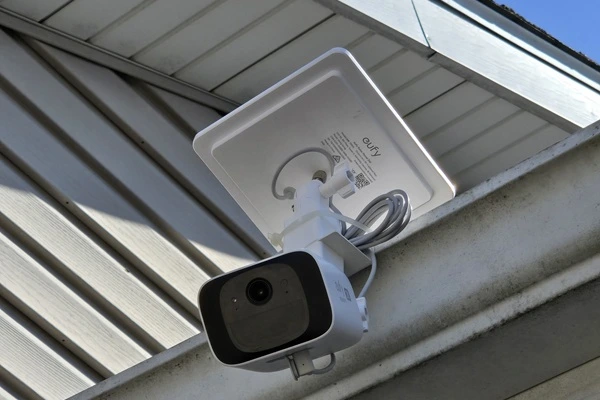
Adding Eufy’s supplemental solar panel was a game-changer! While third-party options
exist, I wanted to stay within the Eufy ecosystem for maximum compatibility. I relocated my S220
SoloCam to the garage gutter for a better driveway view and connected the solar panel via a
USB-C cable.
The only downside? The cable is unnecessarily long (2 meters), leaving me with extra wire to
manage. A shorter option would be nice. The panel charges the camera by about 12% per sunny day,
which should eliminate the need for manual charging. Low or no maintenance is always a
plus!
I did have to experiment with the supplemental solar panel to find the most effective angle.
Once I had that figured that out, my S220 has never run out of power. Even during cloudy winter
days the charge ever went below 40%.
Drawbacks of the Eufy Eco-System
No Continuous Recording
The cameras will only record when motion is detected, with clips up to one minute
long. They don’t support DVR recording, but you can view a live feed via the Eufy app (which
drains the camera battery). This is less of an issue with the solar cameras which will simply
recharge.
Proprietary System
You can only access Eufy cameras through the Eufy app or website, and an internet
connection is required for viewing footage.
Internet Outages
You will NOT be able to view your videos if your internet goes down. (The app cannot
communicate to the homebase even if your wifi is working.) If your internet is unreliable, you
may wish to use a different system.
Connectivity
All of the products listed here only support 2.4G Wi-fi. It would nice to see future
products to support POE or even 5G Wi-fi. This should help reduce any local latency.
Delay in Notifications
There’s a few seconds’ lag between motion detection and receiving video. The camera
captures the event and transmits it to the homebase. Then the homebase connects to the internet
to send the notification to your cell phone. This delay can be frustrating, especially when you
need to respond quickly. Even a 2 gig fiber connection doesn't remove the delay. I suspect
latency in the cloud is the real cause. Unfortunately there is little that can be done about
it. Perhaps Eufy can address this in the future.
Privacy Concerns
Eufy faced a lawsuit for storing videos despite claiming otherwise. While they say
the footage was used to improve motion detection, this could be an issue for indoor cameras.
Avoid placing them in private areas like bedrooms or bathrooms. If privacy is a concern,
consider a closed-circuit DVR system instead.
Future Plans
As new Eufy products are released, I will upgrade what I have and move the older
devices to additional locations. I would like to have a camera for the back door or yard. I also
plan to run a network cable to my garage which is the farthest point. There, I will install a
range extender to improve connectivity. This will also help with my solar generator, which
relies on Wi-Fi for communication.
Final Thoughts
Eufy is far from perfect, but it’s a solid, budget-friendly security system with
potential. It’s easy to install and configure, making it a great option for those who want a
low cost hassle-free setup. If you need long-range coverage, opt for Wi-Fi-connected models
rather than ones that store video on the base unit. As always, make sure the system meets your
needs before buying. I’ll continue updating this review as I expand my setup.
Amazon Links - These are products we recommend
Meyer Computer is an Amazon Affiliate. We may earn a small commission from qualifying purchases made through the links below.Thank you for supporting us!