
Pi-Hole Review
Internet ad-blocker, web filter, w/optional DHCP & DNS capabilities
UPDATED!
Discovery
My goal was to filter internet traffic such as advertisements and unwanted
tracking requests across an entire home or small business network. I had looked at commercial
web-filtering products such as Barracuda, but wanted something more practical for home use.
This led me to the Pi-hole website. After doing some research, it looked like an extremely
useful
solution. The official website provides the software and installation documentation, and there
are also many community guides available.
The Name 'Pi-hole'
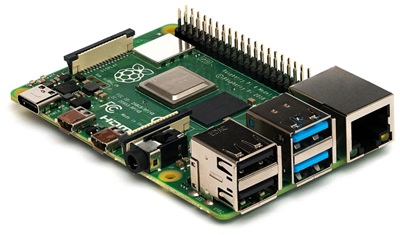
The first part of the name refers to the Raspberry Pi single-board computer
(shown below). It is a small, inexpensive computer often used for hobby projects and
lightweight server tasks. Despite the name, Pi-hole is not limited to Raspberry Pi hardware.
It can run on several supported Linux systems and can also be deployed using Docker.
The 'hole' part refers to a 'sinkhole'. This is the practice of diverting unwanted internet
traffic, such as advertising requests, to a sinkhole or black hole. Pi-hole does this by
responding to DNS requests for blocked domains in a way that prevents the device from
reaching the unwanted destination.
How Does Pi-hole Actually Work?
Pi-hole works by acting as a filter between your devices and the websites they
communicate with. It uses a technology called DNS (Domain Name System), which is essentially
the internet's address book. When you visit a website, your computer needs to look up the
website's address before it can connect.
Think of Pi-hole as a security guard standing at the entrance to your home network. Every
time a device tries to contact an internet address, Pi-hole checks that address against its
collection of known advertising, tracking, and unwanted websites. If the address is on a
blocklist, the request is stopped before the connection can be made. Legitimate requests
are allowed through as usual.
The advantage is that Pi-hole works at the network level rather than relying on software
installed on each computer. This means computers, tablets, smartphones, smart televisions,
and other connected devices can all benefit from the same filtering system.
There is one important limitation: Pi-hole blocks connections to unwanted domains, but it
cannot always remove advertisements that are delivered directly from the same servers
providing the content you are viewing.
Installation
Pi-hole is commonly installed on a Raspberry Pi, but it can also run on other supported Linux hardware, a virtual machine, or in a Docker container. A small, low-power computer is usually sufficient; you do not need a powerful desktop. Be aware that the official project supports specific operating systems and actively maintained releases, so check the current requirements before choosing a Linux distribution. I initially picked Raspberry Pi OS, but I have also used Mint OS and a Docker Container. Each instance was installed on different hardware. You will need to decide how you want to deploy it and follow the appropriate installation instructions. The standard installer automates much of the setup. Pi-hole provides DNS-based filtering and can optionally provide DHCP services as well. It is important to give the Pi-hole system a static IP address or a DHCP reservation so other devices can reliably find it.
Do I Need a Raspberry Pi?
Despite its name, you do NOT need a Raspberry Pi to run Pi-hole. The software can
operate on many different types of hardware, provided the operating system and installation
method are supported.
Pi-hole is relatively lightweight and does not require much processing power for a typical home
network. You do not need to purchase an expensive computer. In fact, some people can run it
using hardware they already own. The important thing is that the device is reliable and remains
powered on whenever you want network-wide filtering.
Ideas on Where to Install Pi-hole
There are quite a few ways to implement Pi-hole. The best option depends on your network, what hardware you already have, and how much you want to spend. Here are some possibilities:
- Raspberry Pi: A popular single-board computer that is small, uses very little electricity, and works well for Pi-hole. However, Raspberry Pi prices have increased considerably, making some alternatives worth considering.
- ZimaBoard: A small, low-power computer that offers more processing power and additional connectivity options. This is another possibility if you want something beyond a basic Raspberry Pi.
- Used Mini Desktop: Consider a used HP, Dell, or Lenovo business-class mini desktop. These can often be found at reasonable prices on sites like eBay.
- Older Desktop or Laptop: Repurpose an older computer running a supported Linux distribution. This may use more electricity, but it can provide plenty of performance.
- Virtual Machine: Set up a virtual machine using Hyper-V, VirtualBox, or Proxmox on an existing computer or server. Just remember that the host system must remain powered on for Pi-hole to operate.
- NAS: Some Synology and other network-attached storage devices support Docker containers or applications that can run Pi-hole. This can be a convenient option if you already own a compatible NAS. This is a convenient option if you already own a compatible NAS. This is how I have my own Pi-hole installation configured.
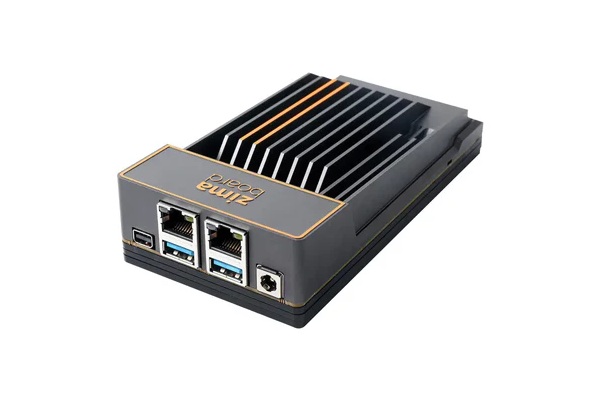
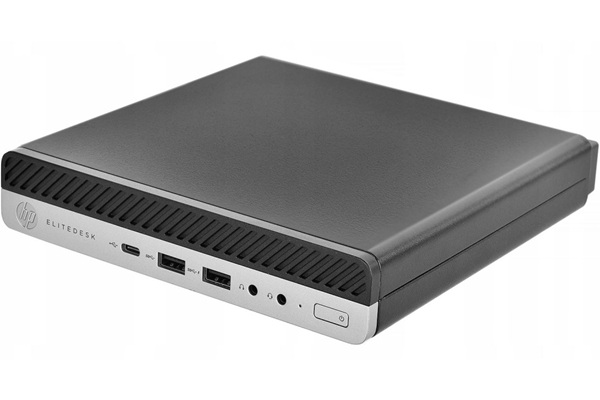
You do not need an expensive computer. Pi-hole is relatively lightweight and
does not require much processing power for a typical home network. However, the device
should be reliable and remain powered on whenever you want network-wide filtering.
I personally prefer using dedicated hardware or an existing server rather than relying on my everyday desktop computer. That way, shutting down my computer does not interrupt Pi-hole services.
Will Pi-hole Work With My Existing Router?
In most cases, YES! You generally do not need to replace your existing internet
router or purchase special networking equipment. Pi-hole works alongside your existing
router and internet connection.
The router or individual devices simply need to be configured to use Pi-hole for DNS
services. Once configured properly, devices connected through your home Wi-Fi or wired
network can benefit from its filtering capabilities.
Most installations use the router's DHCP settings to automatically tell connected devices
which DNS server to use. If your router does not support this feature, Pi-hole includes
an optional DHCP server of its own. However, you should disable the router's DHCP server
before enabling the Pi-hole DHCP server to avoid conflicts.
For best results, Pi-hole should have a consistent IP address so your network devices
can always find it.
First Impressions
Pi-hole is great software that simply runs quietly in the background. If you want
to set it up yourself, a basic knowledge of Linux, DHCP, and DNS is beneficial. You can also
have your IT provider configure it for you. Figuring out what to allowlist can sometimes be
challenging because blocking a domain that an application needs can cause features to stop
working. Searching for the affected domain and reviewing the Pi-hole query log usually helps.
I have Pi-hole running in my home lab, where it has significantly reduced unwanted advertising
and tracking requests. It is a useful privacy tool, but it is not a replacement for a firewall,
antivirus software, or other security measures.
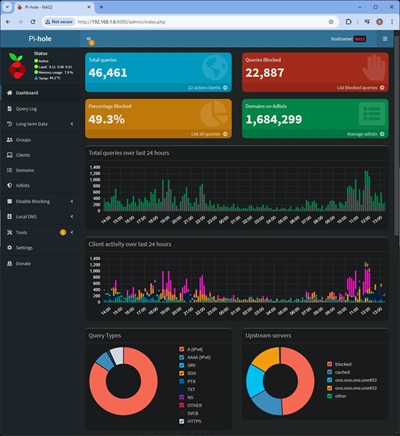
Understanding the Pi-hole Dashboard
One of the nice things about Pi-hole is its web-based dashboard. You do not
need to work from a Linux command prompt to perform many everyday tasks. Simply open
a web browser and access the Pi-hole administration page.
The dashboard provides a quick overview of what is happening on your network. Some of
the information you will see includes:
- Total Queries: The number of DNS requests made by devices on your network.
- Blocked Queries: The number of requests Pi-hole prevented from reaching unwanted domains.
- Percentage Blocked: The percentage of DNS requests that were blocked.
- Permitted Domains: Websites and services that devices are allowed to contact.
- Blocked Domains: Advertising, tracking, and other domains that Pi-hole has stopped.
- Client Activity: Depending on your network configuration and privacy settings, you can see which devices are making requests.
This information can be surprisingly interesting. You may discover that your
smart television, cellphone, or other connected devices are contacting advertising and
tracking services even when you are not actively using them.
It is also a useful troubleshooting tool. If a website or application stops working,
you can look at the query information to see whether Pi-hole is blocking a domain that
the application needs.
Blacklisting
I am using approximately 30 separate blocklists on my Pi-hole. The combined
lists cover a large number of advertising, malware, and tracking domains. There are lists
available for smart TVs, cryptocurrency-related domains, malware, phishing, adult content,
ad servers, and more. You choose what you want to block by including or excluding lists and
individual domains. Lists are updated periodically, so it is a good idea to refresh them and
review any changes. The total number of entries can change over time, and a larger list is
not necessarily a better list. My lists are provided later in the review.
DHCP Feature
The (optional) DHCP server within Pi-hole is relatively basic but performs as
expected for a straightforward home network. In my experience, its configuration options
did not cover some of the advanced DHCP settings I needed, such as options for proxy, NTP,
or WINS servers. This may be a limitation in some environments. I tried it, but ended up
reverting back to DHCP on my router. If your network needs custom DHCP options, check the
capabilities of your current Pi-hole version before switching services.
Does Pi-Hole Block Ads on Streaming Services?
SOMETIMES - Pi-hole can block advertisements when they are
delivered by a separate third-party domain included in your blocklists. Some smart TV and
streaming device menu advertisements may be reduced this way. However, DNS filtering does
not remove page elements or blank spaces the way a browser content blocker can. Results
depend on the device, app, and domains involved.
NO, NOT ALL OF THEM - if advertisements are delivered from the same domain
or infrastructure as the video content, DNS filtering generally cannot distinguish the ad
from the content. YouTube commercials and sponsor spots added by video creators are examples
that Pi-hole generally cannot remove.
Pi-hole works by blocking DNS requests to domains on its deny lists. It can be very effective
against some third-party advertising and tracking domains, but it will not stop every ad.
It can still make a noticeable difference across many devices.
Does Pi-Hole Block Ads within Games?
Maybe - Ads may still display if they are delivered by the game
provider or from the same domain used by the game. If the game contacts a separate third-party
advertising domain that is on your blocklist, Pi-hole may block that request. Some games
may stop working correctly if required domains are blocked.
Use Case
Pi-hole is suitable for many home networks, home labs, and some small businesses.
It works primarily by filtering DNS queries, which require relatively little processing
power. Actual capacity depends on the hardware, network design, and number of clients.
Pi-hole is much more affordable than a commercial secure web gateway, especially if you
already have suitable hardware. However, it is not a direct replacement for a commercial
web-filtering platform. Products designed for larger organizations may provide centralized
management, advanced reporting, policy controls, support, and other security features that
Pi-hole does not provide by itself. Larger businesses should evaluate those requirements
before relying on DNS filtering alone.
Advantages
Unlike traditional endpoint security software that must be installed on each
computer, Pi-hole can provide DNS filtering for devices across your network. This can include
smart TVs, Roku devices, Fire TV devices, camera systems, cellphones, tablets, smart watches,
and more, provided they use Pi-hole for DNS. It can reduce requests to advertising and
tracking domains, and the Pi-hole software itself does not require a subscription. Keep in
mind that devices or applications using their own DNS service may bypass this filtering.
Pi-hole is a useful additional layer, not a complete security solution.
Disadvantages and Limitations
Although I am a big fan of Pi-hole, it is not a perfect solution. There are
some limitations that potential users should understand before installing it.
First, Pi-hole does not block every advertisement. It works primarily by filtering DNS
requests, so advertisements delivered from the same domain as the content you are viewing
can be difficult or impossible to block without breaking the website or application.
Second, some websites and applications may stop working properly when one of their
required domains is blocked. This is where whitelisting becomes important. You may need
to allow certain domains to restore normal operation. Finding the correct domains can
sometimes involve a little trial and error.
Third, Pi-hole requires a device that remains powered on and connected to your network.
If the server goes offline, devices relying on it for DNS may have trouble accessing
websites until the problem is resolved.
Another consideration is that some devices have their own DNS settings or use alternative
DNS services. These devices may bypass Pi-hole unless your network is configured to
account for them.
Finally, the initial installation and network configuration require some basic technical
knowledge. Once everything is working, however, everyday operation is relatively simple.
Will Pi-hole Slow Down My Internet?
Generally, NO. Pi-hole does not process your regular internet traffic or act
as a replacement for your router. It primarily handles DNS requests, which are relatively
small and require very little processing power.
In fact, blocking unwanted advertising and tracking requests can sometimes make websites
feel faster because your devices have fewer unnecessary connections to make. It can also
reduce the amount of data downloaded by blocking certain advertising content.
However, Pi-hole does not increase the actual speed of your internet connection. If you
subscribe to a 300 Mbps internet plan, installing Pi-hole will not turn it into a 500 Mbps
connection. Its benefits are primarily related to filtering, privacy, and reducing
unnecessary network activity.
What Happens If Pi-hole Stops Working?
This is a reasonable concern, especially if you are using Pi-hole to provide
DNS services for your entire household. If the device running Pi-hole loses power,
crashes, or becomes disconnected from the network, devices that rely on it may have
trouble accessing websites.
Your internet connection itself may still be working perfectly. The problem is that
devices cannot properly look up the addresses of the websites they want to visit.
The easiest solution is to restart the Pi-hole device and verify that its services are
running. If the hardware has failed, you can temporarily change your network's DNS
settings to use another DNS provider until Pi-hole is restored.
Some people configure a second Pi-hole server for redundancy. This provides another
DNS server if the primary one becomes unavailable. Simply adding a public DNS server
as a secondary DNS address is not always a reliable way to maintain filtering, because
some devices may use that alternate server and bypass Pi-hole even when the primary
server is working.
Can I Use Pi-hole When I Am Away From Home?
By default, Pi-hole protects devices that are using it for DNS while connected
to your home network. What happens when you take your cellphone or laptop somewhere
else?
You can extend Pi-hole's protection to remote devices by setting up a VPN (Virtual Private
Network) connection back to your home network. When properly configured, your device can
send its DNS requests through your home Pi-hole even when you are using a public Wi-Fi
connection or cellular data.
This is particularly useful if you want the same advertising and tracking protection
while traveling. However, it does require additional configuration and a properly secured
VPN connection.
Does Pi-hole Collect Information About My Internet Activity?
Pi-hole includes logging features that allow you to see which devices are
making DNS requests and which internet domains they are trying to contact. This is one
of its more interesting features, especially if you are concerned about privacy.
For example, you might discover that a smart television is contacting advertising
companies, a cellphone is communicating with tracking services, or a computer is
checking for software updates in the background.
The query log can be useful for identifying unwanted activity and troubleshooting
applications that are not working properly. However, it is important to understand that
DNS logs do not show everything someone does online. They generally show domain lookups,
not the contents of encrypted website traffic or the specific pages someone visits.
You can also adjust Pi-hole's privacy and logging settings to control how much information
is retained. This is worth considering if multiple people share your network.
Does Pi-hole Protect Against Viruses and Malware?
Pi-hole can provide an additional layer of protection by blocking connections
to known malicious domains, phishing websites, and other unwanted destinations included
in your blocklists.
However, it is NOT a replacement for antivirus software, endpoint protection, or a
properly configured firewall. It does not scan downloaded files, inspect every website
for malicious content, or remove malware that is already installed on a computer.
Think of Pi-hole as another layer of network protection. It works best when combined
with other security measures, including keeping your operating system updated, using
reputable security software, and practicing safe browsing habits.
Pi-hole vs. Other Ad-Blocking Solutions
Pi-hole is not the only way to block advertisements and tracking. Several other
products use DNS filtering, while browser extensions work at a different level. The best choice
depends on whether you want network-wide filtering, an easy hosted service, more advanced DNS
features, or detailed control inside a web browser.
Pi-hole
Pi-hole is a self-hosted DNS sinkhole. You install it on your own hardware and configure your router or individual devices to use it for DNS. It is lightweight, highly configurable, and provides useful query logging and blocklist management. It is a particularly good choice for home labs and users who want control over their own network filtering. The trade-off is that you are responsible for the hardware, updates, backups, and troubleshooting.
AdGuard Home
AdGuard Home is probably the closest direct competitor to Pi-hole. It also provides network-wide DNS filtering and supports custom blocklists. It includes several features that may require additional software or configuration with Pi-hole, including encrypted upstream DNS options, parental controls, and Safe Search controls. AdGuard Home is a good option for someone who wants more features built into one package and a relatively straightforward setup. Pi-hole remains an excellent choice for users who prefer its interface, community, and established ecosystem.
Technitium DNS Server
Technitium DNS Server is more than an ad blocker. It is a full-featured DNS server that supports blocklists, recursive and authoritative DNS, encrypted DNS protocols, DNSSEC, clustering, and an optional DHCP server. It runs on Windows, Linux, macOS, and through Docker. This makes it attractive to administrators who want extensive DNS control or need features beyond basic ad blocking. It may be more complicated than necessary for someone who simply wants to block ads at home.
NextDNS
NextDNS provides DNS filtering as a hosted cloud service. Instead of maintaining a local Pi-hole computer, you create a configuration and point your devices or router to the NextDNS service. It offers blocklists, security filtering, parental controls, analytics, and encrypted DNS options. It is convenient for people who want filtering without maintaining hardware. The disadvantages are that your DNS requests are handled by an outside provider and usage beyond the free monthly allowance requires a paid plan for continued filtering.
uBlock Origin
uBlock Origin is a browser extension, not a network-wide DNS filter. It can block advertisements, trackers, and page elements inside supported browsers. Because it works within the browser, it can use more detailed filtering rules than a DNS sinkhole, including cosmetic filtering that removes empty ad spaces or page elements. However, it does not automatically protect smart TVs, streaming boxes, game consoles, or applications outside the browser. Browser support and extension capabilities also depend on the browser being used.
Which One Should You Choose?
- Pi-hole: Best for people who want free, self-hosted, network-wide DNS filtering and control over their blocklists.
- AdGuard Home: Best for users who want a Pi-hole-like system with more built-in filtering and encrypted DNS features.
- Technitium DNS Server: Best for advanced users and administrators who need a full DNS server with extensive configuration options.
- NextDNS: Best for people who want cloud-managed filtering without maintaining a local server.
- uBlock Origin: Best for detailed ad and page-element blocking inside a supported web browser.
These solutions are not necessarily mutually exclusive. For example, Pi-hole can provide network-wide filtering while a browser extension provides additional protection and cosmetic filtering within the browser. DNS filtering and browser filtering work at different levels, so combining them can provide broader coverage.
Maintenance and Backups
One of the nice things about Pi-hole is that it does not require constant
attention once it has been properly configured. In my experience, most of the work
involves occasional software updates, reviewing blocklists, and making adjustments
when a website or application has trouble working.
There are a few maintenance tasks worth performing periodically:
- Install available Pi-hole software updates.
- Update your subscribed blocklists.
- Check that the Pi-hole server is running properly.
- Review blocked domains if an application or website stops working.
- Back up your configuration in case you need to reinstall or move Pi-hole to different hardware.
Pi-hole includes a feature called Teleporter that allows you to export and
import configuration information. This can save considerable time if you ever need
to rebuild your installation or move it to another device.
I recommend keeping a backup somewhere other than the Pi-hole device itself. That way,
if the hardware fails, you still have your configuration available.
NEW - Pi-hole Blocklists
I use over 30 different blocklists from various sources. At the time I last
checked my installation, the combined lists covered more than 1.2 million domains, although
this number changes as lists are updated and overlapping entries are removed. GitHub and
Firebog are useful places to discover lists. Categories include malware, cryptocurrency-related
domains, smart TVs, advertising servers, malvertising, trackers, and phishing. I prefer using
separate lists by category so I can choose what to block and remove a category if it causes
problems. More lists are not automatically better; overlapping, outdated, or overly aggressive
lists can create unnecessary maintenance and false positives.
https://adaway.org/hosts.txt


https://bitbucket.org/ethanr/dns-blacklists/raw/8575c9f96e5b4a1308f2f12394abd86d0927a4a0/bad_lists/Mandiant_APT1_Report_Appendix_D.txt


https://gitlab.com/quidsup/notrack-blocklists/raw/master/notrack-malware.txt


https://hostfiles.frogeye.fr/firstparty-trackers-hosts.txt


https://pgl.yoyo.org/adservers/serverlist.php?hostformat=hosts&showintro=0&mimetype=plaintext


https://phishing.army/download/phishing_army_blocklist_extended.txt


https://raw.githubusercontent.com/anudeepND/blacklist/master/adservers.txt


https://raw.githubusercontent.com/AssoEchap/stalkerware-indicators/master/generated/hosts


https://raw.githubusercontent.com/bigdargon/hostsVN/master/hosts


https://raw.githubusercontent.com/crazy-max/WindowsSpyBlocker/master/data/hosts/spy.txt


https://raw.githubusercontent.com/DandelionSprout/adfilt/master/Alternate%20versions%20Anti-Malware%20List/AntiMalwareHosts.txt


https://raw.githubusercontent.com/danhorton7/pihole-block-tiktok/main/tiktok.txt


https://raw.githubusercontent.com/FadeMind/hosts.extras/master/add.2o7Net/hosts


https://raw.githubusercontent.com/FadeMind/hosts.extras/master/add.Risk/hosts


https://raw.githubusercontent.com/FadeMind/hosts.extras/master/UncheckyAds/hosts


https://raw.githubusercontent.com/Perflyst/PiHoleBlocklist/master/SmartTV.txt


https://perflyst.github.io/PiHoleBlocklist/regex.list


https://raw.githubusercontent.com/Spam404/lists/master/main-blacklist.txt


https://raw.githubusercontent.com/StevenBlack/hosts/master/hosts


https://s3.amazonaws.com/lists.disconnect.me/simple_ad.txt


https://s3.amazonaws.com/lists.disconnect.me/simple_malvertising.txt


https://v.firebog.net/hosts/AdguardDNS.txt


https://v.firebog.net/hosts/Admiral.txt


https://v.firebog.net/hosts/Easylist.txt


https://v.firebog.net/hosts/Easyprivacy.txt


https://v.firebog.net/hosts/neohostsbasic.txt


https://v.firebog.net/hosts/Prigent-Ads.txt


https://v.firebog.net/hosts/Prigent-Crypto.txt


https://v.firebog.net/hosts/Prigent-Malware.txt


https://v.firebog.net/hosts/RPiList-Malware.txt


https://v.firebog.net/hosts/RPiList-Phishing.txt


https://v.firebog.net/hosts/static/w3kbl.txt
NEW - LG Monitor and Television Privacy Concerns
LG has attracted considerable attention recently following investigations by Gamers Nexus,
Level1Techs, and other technology researchers. These investigations raised concerns about
unwanted software installations, advertising, data collection, and privacy practices involving
certain LG monitors and smart televisions.
Some LG monitors have been reported to install the LG Monitor App Installer through Windows
Update when connected to a computer. Gamers Nexus demonstrated that this software could display
McAfee promotional advertisements and install without an obvious user approval process.
Although I do not own an LG television, I do own a pair of 32-inch LG monitors. About a year
after purchasing them, I started receiving recurring pop-ups prompting me to install McAfee
security software. I can personally confirm that these prompts appeared on my Windows computer.
After some research, I followed instructions to change a Windows setting that prevents USB
devices from automatically installing software without my approval. This stopped the unwanted
prompts. While my experience involved LG monitors rather than a television, it does raise
similar concerns about unwanted software promotions and how connected hardware interacts with
Windows.
Separate investigations involving LG smart televisions raised additional privacy concerns.
Researchers reported network discovery activity, Automatic Content Recognition (ACR), and
microphone-related security issues. Some of their testing demonstrated the ability to retrieve
audio and related information under specific conditions, including when a television appeared to
be off or disconnected from the internet.
LG has disputed the allegations concerning ambient audio recording. The company maintains that
voice processing occurs only when users activate supported voice recognition features and that
audio used for wake-word detection is processed locally.
These findings should not be interpreted as proof that every LG monitor or television behaves
identically. However, they raise legitimate questions about device privacy, advertising, and the
amount of information smart devices collect.
Block the following LG telemetry and ad domains using the Regex option. These may or may not already be in your block lists. You can manually add them to be sure. Likewise there may be other LG domains that are not listed here. If you have an LG device, you may want to monitor your network traffic to see if additional domains should be blocked.
- nextlgsdp.com
- lgtvcommon.com
- lgsmartad.com
- lgtviot.com
- lgthinq.com
- ngfts.lge.com
- snu.lge.com
- su.lge.com
- su-ssl.lge.com
- nsu.lge.com
Troubleshooting Common Pi-hole Problems
Most Pi-hole problems are related to network configuration, DNS settings, or blocklists. Here are a few things to check before assuming the software itself is broken.
Pi-hole is installed, but advertisements are still appearingFirst, verify that the affected device is actually using Pi-hole as its DNS server. Check the DNS settings supplied by your router's DHCP server, and make sure the device has renewed its network settings. Some routers, devices, VPN applications, and browsers can use their own DNS service instead. Browsers may also use DNS-over-HTTPS, which can bypass the DNS server configured by your router. IPv6 DNS settings should be checked as well.
A website or application stops workingA blocklist may be blocking a domain that the website or application needs. Open the Pi-hole query log and look for blocked domains associated with the affected device. If you identify a legitimate domain, add it to the allowlist rather than disabling all filtering. Some applications require several related domains, so test the application again after making changes.
Devices cannot access the Internet when Pi-hole is offlineThis is an important consideration when Pi-hole is the only DNS server configured on your network. If the Pi-hole computer shuts down or loses power, clients may no longer be able to resolve website names. Consider using reliable hardware, keeping backups, and monitoring the service. A second Pi-hole can provide redundancy when configured correctly. Simply entering a public DNS server as a secondary DNS address on clients is not a dependable way to guarantee filtering, because some devices may use either DNS server.
Pi-hole does not show individual device namesIf your router is providing DHCP addresses, Pi-hole may only show IP addresses instead of recognizable device names. You can configure conditional forwarding when your router supports it, or use Pi-hole as the DHCP server. The correct setup depends on your network and router.
Blocklists do not appear to be updatingCheck the status of the list update process and confirm that the Pi-hole computer has Internet access and can reach the list providers. Pi-hole's Gravity process downloads and combines subscribed blocklists. You can also review the official documentation for the commands and update procedure for your installed Pi-hole version.
My Experience with Long Term Use
I first installed a Pi-Hole in October of 2022. It was one of the best decisions
I have made for my household and home-based business. Yes, there was a learning curve. I
went through several iterations getting it setup as I was new to Linux at the time. Each
time gave me more and more experience. I learned a LOT along the way. Once I had Pi-Hole
installed on the final hardware, it hasn't been touched other than installing software
updates and tweaking the blacklist. Allowing certain streaming apps proved to be the hardest
part. (Paramount+ streaming was challenging.) Google searches solved most of the blacklist
issues, but a few had to be fixed by trial and error. Now that I have used it for several
years, I can’t imagine not having it.
Frequently Asked Questions About Pi-hole
Do I need a Raspberry Pi to run Pi-hole?No. Despite its name, Pi-hole can run on other supported Linux systems, virtual machines, and Docker containers. A Raspberry Pi is simply a popular low-power option. You can also use a small desktop computer or other suitable hardware.
What are the minimum hardware requirements for Pi-hole?Pi-hole is lightweight. The official documentation lists 512 MB of RAM and at least 2 GB of free storage as minimum requirements, with 4 GB of storage recommended. A low-power computer is normally sufficient for a typical home network. Always check the current operating-system and hardware requirements before installing.
Does Pi-hole need a static IP address?Yes. The Pi-hole system should have a consistent IP address so your router and network devices can always find its DNS service. You can assign a static IP address directly on the computer or create a DHCP reservation in your router. A DHCP reservation is often the easiest option.
How do I make all my devices use Pi-hole?The usual method is to configure your router's DHCP settings to provide the Pi-hole IP address as the DNS server. Devices that obtain their network settings automatically will then use Pi-hole. If your router does not allow custom DNS settings, you may be able to use Pi-hole's DHCP server instead. Disable the router's DHCP server before enabling Pi-hole's DHCP service so that two DHCP servers do not compete on the same network.
Does Pi-hole block YouTube, Netflix, and streaming service advertisements?It depends on how the advertisements are delivered. Pi-hole can block some third-party advertising and tracking domains used by streaming devices and applications. However, it generally cannot remove advertisements delivered from the same domains or infrastructure as the video content. YouTube commercials and advertisements integrated into a streaming service are examples that DNS filtering may not be able to block.
Can Pi-hole block advertisements on smart TVs and phones?Yes, provided those devices use Pi-hole for DNS and the advertising domains are included in your blocklists. This can include smart TVs, streaming boxes, phones, tablets, and other network-connected devices. Some devices and applications use their own DNS settings or encrypted DNS, which may bypass Pi-hole.
Will Pi-hole make my Internet connection faster?It can make some websites and applications feel faster by preventing requests to blocked advertising and tracking domains. It can also reduce the amount of data transferred. The improvement varies by website, device, and network. Pi-hole does not increase the speed provided by your Internet service provider.
Is Pi-hole a replacement for antivirus or a firewall?No. Pi-hole can block requests to known advertising, tracking, and malicious domains, depending on the blocklists you configure. It does not inspect every file or connection, and it cannot guarantee that a website or download is safe. Continue using appropriate endpoint protection, a firewall, software updates, and safe browsing practices.
Can Pi-hole protect devices when I am away from home?Not automatically. Pi-hole normally protects devices that send their DNS requests to it. When a phone or laptop leaves your home network, it will usually use another DNS service. Remote access requires an appropriately configured VPN or another secure DNS arrangement. Do not expose the Pi-hole DNS service directly to the public Internet.
Can I use Pi-hole with another ad blocker?Yes. Pi-hole works at the DNS level, while browser extensions such as uBlock Origin can filter individual page elements and advertisements inside supported browsers. Using both can provide broader coverage. Be aware that overlapping filters can sometimes require troubleshooting.
How do I update Pi-hole and its blocklists?Pi-hole software updates and blocklist updates are separate tasks. Use the update procedure documented for your installed Pi-hole version to update the software. Gravity updates the subscribed blocklists, and Pi-hole also performs scheduled list updates. Review the official release notes before major software upgrades.
What should I check if Pi-hole stops resolving website names?Check that the Pi-hole service is running, the computer has network connectivity, and the configured upstream DNS server is reachable. Confirm that clients are using the correct Pi-hole IP address and that another DNS service is not already occupying the required port. Review the query log and run the Pi-hole diagnostic tool if the problem continues. The official Pi-hole documentation and support forum are useful resources.
Is Pi-hole free to use?Yes. Pi-hole is open-source software and does not require a subscription. You may still have expenses for hardware, electricity, storage, or optional supporting services. If you already own suitable equipment, the software itself can be installed without purchasing a license.
Is Pi-hole difficult to maintain?Once configured correctly, Pi-hole generally requires very little attention. You should keep the operating system and Pi-hole software updated, review blocklists periodically, and investigate any applications that stop working. The initial setup and troubleshooting can require some familiarity with Linux, DNS, and DHCP.
Amazon Links - These are products we recommend
Meyer Computer is an Amazon Affiliate. We may earn a small commission from qualifying purchases made through the links below.Thank you for supporting us!
- GL.iNet GL-SFT1200 Opal Travel Router, AC1200 Dual-Band Wi-Fi
- GL.iNet GL-MT3000 Beryl AX Wi-Fi 6 Travel Router
- GL.iNet GL-BE9300 Flint 3 Tri-Band Wi-Fi 7 Router
- Logitech G305 Lightspeed Wireless Gaming Mouse - White
- Logitech G305 Lightspeed Wireless Gaming Mouse - Blue
- Logitech G305 Lightspeed Wireless Gaming Mouse - Black
- be quiet! Dark Perk Sym PC Gaming Mouse, 55g Lightweight, 32,000 DPI - Symmetrical
- be quiet! Dark Perk Sym PC Gaming Mouse, 55g Lightweight, 32,000 DPI - Ergonomic
- Keychron K10 Full Size 104 Keys Bluetooth Wireless Mechanical Gaming Keyboard
- NZXT Function - Full Size Mechanical Keyboard - Black
- Keychron K10 Max QMK Wireless Custom Mechanical Full-Size Keyboard
- PNY 32GB Attaché X USB 3.2 Gen 1 Flash Drive 5-Pack
- SANDISK 32GB 3-Pack Ultra USB 3.0 Flash Drive
- SANDISK 64GB 2-Pack Ultra USB 3.0 Flash Drive
- SANDISK 128GB Ultra, USB-A Flash Drive