
|
|
||||||||||
The Pros and Cons of Cloud Storage and Cloud Backups
There are some drawbacks to consider
Keywords:
cloud, storage, backups, disaster, recovery
Key Takeaway:
Popular platforms like Google Drive,
Microsoft OneDrive, Dropbox, and iCloud make it easy to store files online and
access them from almost anywhere.
Category Insights:
BEGINNER — This article is written to be accessible for newcomers to the
topic.
INTERNET — This article contains internet related content.
Digital Storage Explained
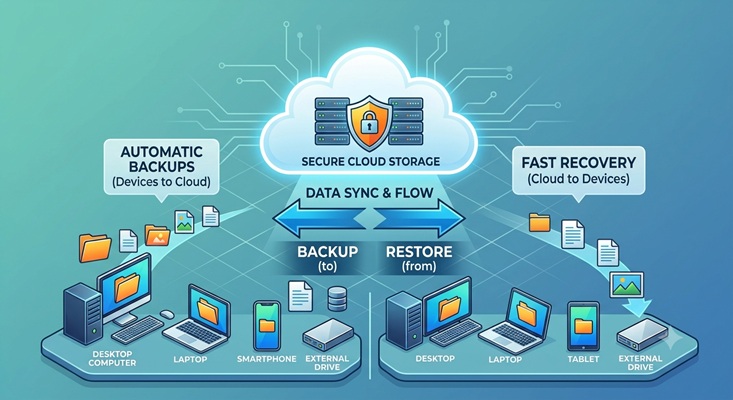
Cloud storage and cloud backups have become a normal part of everyday life. Whether you are storing family photos, business documents, or important financial records, chances are you are already using a cloud service. Popular platforms like Google Drive, Microsoft OneDrive, Dropbox, Carbonite, and iCloud make it easy to store files online and access them from almost anywhere.
For many people and businesses, cloud storage offers convenience that would have been difficult to imagine just a few years ago. However, while cloud services provide many benefits, they also come with risks and limitations that should be considered before relying on them as your only backup solution.
| Reference |
|---|
| #0054 Beginner What is Microsoft OneDrive? |
Advantages of Cloud Storage
Disaster protection - Because your files are stored in professionally managed data centers, they are usually protected against local disasters such as fires, floods, tornadoes, theft, or hardware failures that could destroy a computer or server in your home or office. Many cloud providers also keep multiple copies of your data in different geographic locations to improve reliability.
Accessibility - As long as you have an Internet connection and the proper login credentials, your files can be available from your home, office, hotel room, or even while traveling overseas. This makes it much easier to work remotely or retrieve important documents when you are away from your primary computer.
Collaboration - Instead of emailing large files back and forth, multiple people can work on the same documents from different locations. Businesses often use cloud services to keep employees connected, while families use them to share photos, videos, and other important files.
Less Hardware - Cloud storage also reduces the amount of hardware you need to own and maintain. There is no need to purchase expensive file servers, replace failing hard drives, maintain backup equipment, or worry about power failures damaging local storage devices. If your computer fails, you can often restore your files to a new computer after signing into your account.
Despite these advantages, cloud storage is not perfect.
Disadvantages of Cloud Storage
This list highlights some of the most common concerns that people have when using cloud storage and cloud backups. Understanding these issues can help you make informed decisions about how to protect your data. An individual should NOT expect to encounter all of these issues, but it is important to be aware of them before relying on cloud storage for your backups.
Connection Issues - Every file must be uploaded over your Internet connection. If you have a slow connection or are backing up hundreds of gigabytes or even terabytes of data, the initial upload can take days or even weeks. Internet interruptions can slow the process even more, and using a Virtual Private Network (VPN) often reduces transfer speeds further because the data must pass through another encrypted connection.
Data Encryption - Encryption is another factor that many people overlook. Good encryption helps protect your files while they are being transmitted and stored, but it also requires additional processing power. Your computer must encrypt the data before it leaves your system and decrypt it when you access it later. Modern computers usually handle this well, but older systems may experience slower performance during large backups.
Privacy - Privacy is another important concern. Before choosing a cloud provider, ask who controls the encryption keys. Some services manage the encryption for you, while others offer end-to-end encryption that gives only you access to the keys. If the provider controls the encryption keys, there may be situations where authorized employees, legal requests, or security incidents could potentially expose your data.
Cost - Cost is another consideration. Many cloud providers advertise inexpensive monthly plans, but those costs can increase significantly as your storage needs grow. Businesses storing several terabytes of data may spend hundreds or even thousands of dollars each year. Some backup providers also charge additional fees when restoring large amounts of data, so it is important to understand the pricing before committing to a service.
Internet Reliability - Cloud storage also depends entirely on your Internet connection. If your Internet service goes down, you may be unable to access important files until service is restored. This can be especially frustrating during emergencies or severe weather events when access to important documents may be critical.
Security Breaches - Security breaches are another risk. Major cloud providers invest billions of dollars into cybersecurity, but no system is completely immune from attacks. A successful breach could potentially expose customer information, although reputable providers work hard to minimize this risk through security updates, monitoring, and multi-factor authentication.
Account Management - Account management can also become a problem. If you stop paying your subscription, allow your payment method to expire, or forget your account credentials, you could lose access to your stored files. Keeping recovery information current and enabling multi-factor authentication can help prevent these situations.
Data Recovery - Recovery speed is another issue that is often overlooked. Restoring a few documents usually takes only minutes, but recovering an entire computer or several terabytes of data over the Internet may require many hours or even several days. Some backup providers offer faster recovery options by shipping encrypted hard drives directly to customers, but this service may involve additional fees.
Legal Considerations - Some people also worry about government access to cloud data. In certain situations, law enforcement agencies may obtain a court-approved warrant to access information stored with a cloud provider. It is worth remembering that the same legal process can also apply to computers and storage devices located in your home or business.
An Alternative to Cloud Storage
An increasingly popular alternative is using a Network Attached Storage (NAS) device as your own private cloud. A NAS is essentially a dedicated file server that sits in your home or office, allowing you to securely access your files over the Internet while maintaining complete control over your data. Although purchasing a NAS and hard drives requires a larger upfront investment than subscribing to a cloud service, the long-term costs are often much lower because there are little to no monthly storage fees. As your storage needs grow, many NAS systems allow you to add larger or additional drives instead of paying for more cloud storage every month. You also decide who has access to your files, where your data is stored, and who controls the encryption keys. For users concerned about privacy, recurring subscription costs, or storing several terabytes of data, a NAS can provide an excellent balance between convenience, security, and long-term value. However, unlike cloud providers, you are responsible for maintaining the hardware, performing software updates, replacing failed drives, and ensuring your backups are working properly. Many people choose a hybrid approach by using a NAS for everyday storage and backups while also keeping a copy of their most important files in the cloud for off-site disaster protection.
| Reference |
|---|
| #0062 Harddrives What Is a NAS? A Guide to Network Attached Storage |
The 3-2-1 Backup Strategy
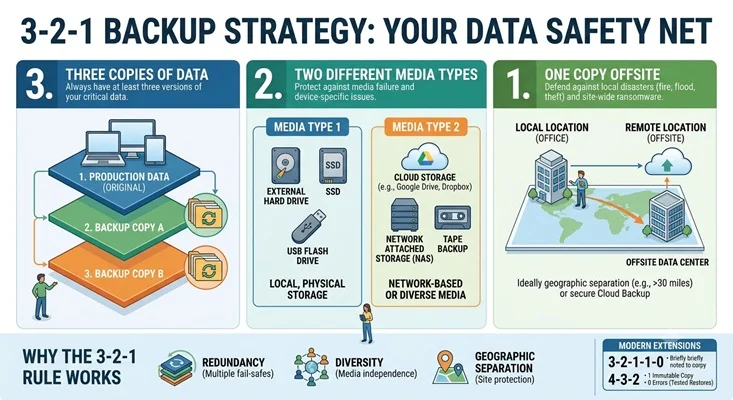
Ultimately, cloud storage is an excellent tool, but it should not be your only backup strategy. Many IT professionals recommend following the 3-2-1 backup rule: keep three copies of your data, store them on at least two different types of media, and keep one copy off-site. Combining cloud backups with local backups provides better protection against hardware failure, ransomware attacks, accidental deletion, and natural disasters.
Cloud storage offers convenience, flexibility, and excellent disaster recovery, but it also introduces concerns involving privacy, Internet availability, subscription costs, and recovery times. Understanding both the advantages and disadvantages will help you choose a backup strategy that protects your valuable data while meeting your budget and security needs.
Frequently Asked Questions
What is cloud storage?
Cloud storage is a service that stores your files on remote servers accessed over the
Internet. This allows you to access your data from multiple devices and locations.
Is cloud storage the same as a backup?
Not always. Some services focus on file synchronization, while others are designed
specifically for backups. Important data should be protected by a complete backup strategy
rather than relying solely on synchronization.
Is cloud storage safe?
Reputable cloud providers use encryption, security monitoring, and other safeguards to
protect customer data. However, no system is completely immune from cyberattacks, account
compromises, or human error.
What happens if my Internet connection goes down?
Depending on the service, you may lose access to files that are stored only in the cloud
until your Internet connection is restored. Many applications can keep local copies of
recently used files for offline access.
Can cloud storage replace an external hard drive?
Cloud storage can reduce the need for external drives, but many experts recommend using
both. Local backups provide quick recovery while cloud storage provides off-site disaster
protection.
What is the 3-2-1 backup rule?
The 3-2-1 strategy recommends maintaining three copies of your data, storing them on at
least two different types of media, and keeping one copy off-site.
What is a NAS device?
A NAS (Network Attached Storage) device is a dedicated file server that allows users to
store and access files over a network while maintaining control over their own hardware and
data.
Is a NAS better than cloud storage?
Neither is universally better. A NAS offers greater control and can reduce long-term costs,
while cloud storage provides off-site protection and eliminates the need to maintain your
own hardware.
Can I lose access to my cloud files?
Yes. Lost passwords, expired subscriptions, account lockouts, billing problems, or provider
outages can affect access to cloud-stored files.
What is the best backup strategy?
Many IT professionals recommend a hybrid approach that combines local backups, cloud
backups, and off-site storage to provide protection against hardware failure, ransomware,
accidental deletion, and natural disasters.