
Ooma Review
Low-cost VOIP solution for home and small business
What is VOIP?
Voice over Internet Protocol, better known as VoIP, is a technology that allows
phone calls to travel over the internet instead of traditional telephone lines. In simple terms,
it turns your internet connection into a phone service. This approach has become increasingly
popular because it can lower monthly costs while adding features that older landline systems
often charge extra for.
Many small businesses and home offices still rely on dedicated phone numbers for customer calls,
and some even continue to use fax machines. VoIP offers a practical solution without the high
cost of traditional phone service. Since calls travel over the internet, long-distance fees are
usually eliminated, which can lead to noticeable savings over time.
Large businesses have used VoIP systems for years because they are flexible, scalable, and
cost-effective. Today, homeowners and small business owners can take advantage of the same
technology without needing expensive equipment or complicated installations.
Why I Chose Ooma
For several years, I used phone service through Comcast, which also relies on VoIP
technology. While the service worked fine, I wanted to reduce my monthly expenses for my home
office. After researching different providers, I decided to try Ooma because it supported my
local area code and offered features that were not included with my Comcast plan.
One important thing to know is that not every VoIP provider is available in every area. Before
signing up, you should confirm that your phone number and area code can be transferred to the
service you want to use.
My goal was simple: move my existing business phone number from Comcast to Ooma while keeping
reliable service and gaining additional call management features. For my needs, Ooma turned out
to be one of the better low-cost options available.
Installation and Setup
The equipment arrived within a few days, and setup was surprisingly easy. The Ooma
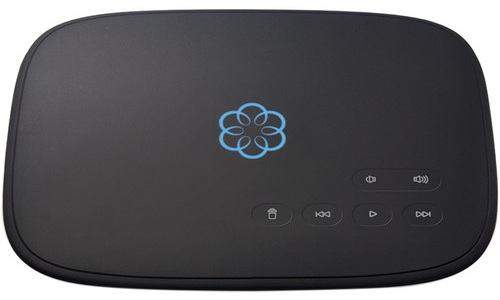
device itself is small and looks similar to a compact answering machine. Installation mainly
involves connecting the unit to your internet service through either Wi-Fi or an ethernet cable.
I chose ethernet because wired connections are generally more stable and reliable for phone
calls.
After connecting the device, the rest of the setup is completed through the Ooma website. The
online dashboard walks you through the process step by step, making it fairly simple even for
users who are not especially technical.
One feature I appreciated was flexibility. You can continue using your existing telephones, buy
Ooma-branded phones, or even skip a physical phone entirely. In my case, I forwarded my business
number directly to my cellphone. This allowed customers to contact me on my business line
without revealing my personal mobile number.
Porting my existing phone number to Ooma took about a week. That process was mostly automatic,
although there can occasionally be delays depending on your current phone provider.
Handsets and Phone Options
One of the nice things about Ooma is the flexibility it offers when it comes to
phones and handsets. If you prefer a traditional home phone experience, you can purchase an Ooma
wireless handset that works much like a standard cordless household phone. The setup feels
familiar, making it easy for anyone who has used a regular landline system.
If you already own a household telephone, there is usually no need to buy new equipment. Ooma
allows you to connect many standard home phones directly to the system, which can save money and
reduce unnecessary hardware purchases.
Another option is to skip a physical phone altogether. This is the approach I chose for my home
office setup. I configured my Ooma line to forward incoming calls directly to my cellphone. This
lets customers reach my business number while keeping my personal mobile number private. It also
means I can answer business calls whether I am in the office or away from home.
The overall system is very flexible, which makes it a good fit for different types of users,
from homeowners looking for a simple landline replacement to small business owners who want more
control over how calls are handled.
Everyday Use and Features
After setup, Ooma works much like a traditional phone service, but with several
modern features built in. Common tools such as voicemail, caller ID, call forwarding, and spam
blocking are easy to configure through the web interface.
The call quality has been excellent overall. Conversations sound clear, and I rarely notice
static, echoes, or dropped calls. Of course, call quality can still depend on the stability of
your internet connection, but under normal conditions the service performs very well.
One of the most useful features is voicemail access. Messages can be checked in several ways.
Ooma can send voicemail recordings directly to your email inbox as audio files, which is
extremely convenient when working remotely. Messages can also be accessed from the Ooma device
itself or through the online dashboard.
The web dashboard became my preferred option because it offers the most control. From there, I
can review caller ID logs, block telemarketers, manage contacts, and customize call settings.
Unwanted callers can either be disconnected automatically or sent straight to voicemail without
the phone ever ringing.
Spam call blocking is especially useful today since robocalls and telemarketing calls continue
to increase nationwide. Having an easy way to filter unwanted calls helps make the service feel
more professional.
Important Reliability Consideration
Unlike traditional landline phones, VoIP systems depend entirely on internet access
and electrical power. If your internet goes down or the power fails, your phone service may stop
working unless you have backup equipment in place.
For better reliability, it is a good idea to use a battery backup system, also known as a UPS,
for your modem, router, and Ooma device. This can keep your phone service running during short
power outages.
Pricing and Billing
Ooma offers different service tiers depending on the features you need. One of the
reasons many people consider Ooma is the lower monthly cost compared to traditional phone
companies.
The basic residential plan is often advertised as low-cost or nearly free aside from taxes and
fees. In my experience, I still occasionally received charges around $18 per month, even while
using the lower-tier option. Pricing structures and fees can change over time, so it is
important to review the latest details directly from the provider before signing up.
There are also premium plans available that include additional business-oriented tools and
advanced call features. For my needs, the basic service was more than enough.
Long-Term Experience
After using Ooma for several years, I still believe it was a good decision for my
home office setup. The system has remained dependable, easy to manage, and far less expensive
than many traditional phone services.
The only hardware issue I experienced involved the speaker on the Ooma unit itself. Over time,
the built-in speaker stopped working properly. However, this did not affect actual call quality,
voicemail recordings, or everyday phone use. Since I rarely used the speaker on the device, I
never felt the need to replace it.
Overall, Ooma has provided a reliable and affordable VoIP solution for both home office users
and small businesses looking to reduce phone costs without sacrificing important
features.