
|
|
||||||||||
What is the Silicon Lottery?
Every chip is different!
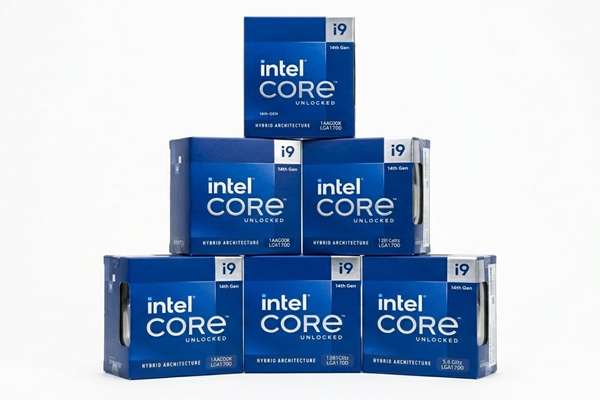
Keywords:
silicon, lottery, performance, power,
semiconductor
Key Takeaway:
If you've ever built a PC or overclocked a
CPU or GPU, you may have heard the term "silicon lottery." But what does it
mean, and why does it matter to tech enthusiasts?
Category Insights:
CPU — The CPU is the brain of the system, driving overall performance.
Introduction
Have you ever wondered why two identical processors can perform differently, even when they
have the same model number? The answer often comes down to something enthusiasts call the
silicon lottery.
Every CPU and GPU goes through a complex manufacturing process. Small variations can affect
power consumption, voltage requirements, heat generation, and overclocking potential. In
this article, we'll explain why this happens, how it affects computer performance, and what
you can do to get the most out of your hardware.
What Is the Silicon Lottery?
The silicon lottery (sometimes referred to as the "chip lottery") refers to the
inherent variability in semiconductor manufacturing. This causes some processors or GPU
chips to perform better than others, even if they are the same exact chip. This happens due
to microscopic differences in the silicon wafers used to create these chips.
While manufacturers strive for consistency, no fabrication process is perfect. Some chips
come out of the production line able to achieve higher clock speeds at lower voltages, while
others require more power or generate more heat. This means that some users get a “golden
sample” with better performance, while others receive a chip that meets the baseline
specifications but doesn’t overclock as well. It's the luck of the draw for the
purchaser.
Diamond Analogy
Here's another way to think about it. Imagine you're shopping for a diamond. One
of the key factors that determines its value is clarity. A diamond with visible
imperfections or a cloudy appearance is typically worth less than one that is flawless or
nearly flawless.
A similar concept applies to computer processors. During manufacturing, tiny imperfections
can occur in the silicon used to create the chip. Processors with favorable electrical
characteristics may be able to operate at higher speeds, require less voltage, or produce
less heat. However, manufacturing variations involve more than simply the number of
imperfections in a silicon chip. Manufacturing variations can affect a processor's
electrical characteristics, but a chip does not necessarily have visible or physical defects
simply because it requires more voltage or has less overclocking headroom. This is one
reason why processors built from the same design can end up with different speed ratings and
price points.
Except, when buying a diamond, you can see the clarity and quality. When buying a CPU or
GPU, you have no way of knowing if you got a golden chip or not. You just have to hope for
the best. You're playing the silicon lottery!
Why Does the Silicon Lottery Happen?
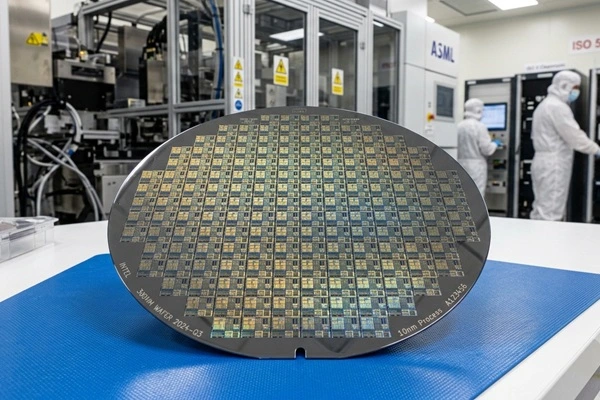
The process of making CPUs and GPUs is highly complex and involves
multiple steps:
• Wafer Fabrication – Semiconductor manufacturers create large silicon
wafers containing numerous individual integrated circuit dies.
• Die Separation and Packaging – Individual dies are separated from the
wafer and packaged so they can be installed in electronic devices.
• Testing and Binning – Manufacturers test processors for electrical
characteristics, functionality, and performance. Chips may be assigned to different product
categories based on their capabilities, configuration, and other manufacturing
requirements.
Since silicon production is influenced by numerous variables—like
material purity, microscopic defects, and even slight inconsistencies in the
etching process—each chip has unique characteristics. Some have better power
efficiency and thermal properties, while others are less optimal but still
functional.
How the Silicon Lottery Affects Consumers
For most people, the silicon lottery doesn’t have a noticeable
impact. If you're running your processor at stock settings, you likely won’t see
major performance differences. However, for enthusiasts who want to overclock
their hardware for extra performance, winning (or losing) the silicon lottery
can make a big difference.
For example, two users with the same Intel or AMD processor may find that one
chip can reach 5.2 GHz on a low voltage, while another struggles to hit 5.0 GHz
even with increased power. The same concept applies to GPUs, where some cards
can be pushed further while staying cool and efficient.
Why Are Some Chips Better Than Others?
The silicon lottery isn't simply about whether a processor has defects. Even chips
manufactured from the same design and production process can have slightly different
electrical characteristics.
These differences can affect several things:
• Voltage Requirements – Some processors can operate at a particular clock
speed using less voltage than another identical processor. Lower voltage can mean less power
consumption and heat.
• Power Leakage – Transistors can have different leakage characteristics.
This affects how much electrical power is lost as heat when a chip operates.
• Thermal Characteristics – Individual chips can have different power
consumption and heat generation. However, cooling equipment, thermal paste, mounting
pressure, and case airflow also influence operating temperatures.
• Overclocking Headroom – Some chips can maintain higher clock speeds
without requiring excessive voltage or becoming unstable. Others reach their limits
sooner.
These differences are part of semiconductor manufacturing. They don't necessarily indicate
that one processor is defective or that another is guaranteed to be faster during everyday
use.
How Does the Silicon Lottery Affect Different CPUs and GPUs?
The silicon lottery affects processors from Intel, AMD, and NVIDIA. However, the amount of
performance enthusiasts can gain from tuning varies considerably depending on the
architecture and model.
Here are some examples of popular processor families and how silicon variation can affect
them.
Intel Processors
Intel Core Ultra 9 285K – This high-end desktop processor features unlocked
tuning capabilities. Individual chips can differ in voltage requirements, temperature, and
their ability to maintain higher clock speeds during demanding workloads.
Intel Core Ultra 7 265K – This processor also supports overclocking.
Differences in electrical efficiency and thermal behavior can affect how much additional
performance an enthusiast can achieve.
Intel Core Ultra 5 245K – Even a lower-tier unlocked processor can benefit
from favorable silicon characteristics. However, the available performance headroom depends
on the chip, motherboard, and cooling solution.
AMD Ryzen Processors
AMD Ryzen 9 9950X – This 16-core processor uses automatic boost technology
to adjust performance according to workload, power, and temperature. Individual chips can
have different voltage and efficiency characteristics.
AMD Ryzen 7 9800X3D – This gaming-focused processor uses AMD 3D V-Cache
technology. Silicon characteristics can affect tuning and efficiency, but overclocking
options differ from conventional Ryzen processors. Precision Boost Overdrive and Curve
Optimizer provide supported tuning options, although the available adjustments and potential
benefits differ from conventional Ryzen processors.
AMD Ryzen 7 9700X – This processor supports Precision Boost Overdrive and
Curve Optimizer. Individual samples can respond differently to voltage adjustments and
performance tuning.
NVIDIA Graphics Cards
The silicon lottery also affects graphics processors. Different GPU samples can have
different voltage requirements, power consumption, temperatures, and overclocking
potential.
GeForce RTX 5090 – As a high-end graphics card, it offers substantial
computing capability. Individual GPU samples may differ in their ability to maintain higher
boost frequencies within their power and thermal limits.
GeForce RTX 5080 – Like other GPUs, some samples may achieve higher stable
clock speeds or better efficiency than others. Cooling and power limits also influence the
results.
GeForce RTX 5070 Ti – Individual samples can respond differently to GPU
overclocking and undervolting. The graphics card's cooling design and power limits can be
just as important as the silicon itself.
Important: These examples do not mean that one particular processor model has better silicon lottery odds than another. There is no dependable public database ranking the silicon quality of all retail processors. Two chips with the same model number can produce different results, and a more expensive processor is not automatically a better overclocker.
Can You Improve Your Chances of Winning?
Unfortunately, there is no guaranteed way to get a golden chip. However, there are several
ways to improve performance or get more efficiency from the processor you already own.
• Pre-Binned Processors – Some specialty retailers sell processors that
have been individually tested and selected for their ability to reach specific performance
targets. These processors are often more expensive because of the additional testing and
selection process. Make sure the retailer provides documented test results and a clear
guarantee of what the processor can achieve.
• Undervolting – Undervolting reduces the voltage supplied to a processor
while attempting to maintain its existing clock speeds. A successful undervolt can reduce
power consumption and heat generation. This may allow the processor to maintain higher boost
speeds for longer periods. However, too much undervolting can cause crashes, errors, and
instability.
• Overclocking – Increasing clock speeds can improve performance when the
processor has sufficient thermal and power headroom. However, not every chip can achieve the
same overclock. Increasing voltage also increases heat and power consumption, so careful
testing is important.
• Better Cooling – A quality air cooler or liquid cooling system can help
keep temperatures under control. This is particularly important for processors that generate
considerable heat under heavy workloads. Better cooling cannot change the silicon lottery,
but it can help prevent thermal throttling and maintain higher boost
frequencies.
• Improved Case Airflow – Properly positioned case fans help remove hot air
and bring cooler air into the system. This can improve temperatures for both the CPU and
GPU.
Comparing Performance Improvement Methods
Each method has advantages and disadvantages. The best approach depends on your hardware, budget, and goals.
| Method | Primary Benefit | Consideration |
|---|---|---|
| Pre-Binned CPU | Verified performance characteristics | Higher purchase price |
| Undervolting | Lower heat and power consumption | Requires stability testing |
| Overclocking | Potentially higher performance | More heat and power |
| Better Cooling | Improved thermal headroom | Additional expense |
| Improved Airflow | Lower system temperatures | Depends on case design |
For most users, improving cooling and optimizing existing settings are better starting points than purchasing an expensive pre-binned processor. The results will vary depending on the hardware and workload.
Troubleshooting Silicon Lottery Performance Issues
If your CPU or GPU isn't performing as expected, don't immediately assume you lost the
silicon lottery. Several other factors can limit performance, including cooling, power
settings, memory configuration, drivers, and motherboard settings.
Before replacing hardware or attempting an aggressive overclock, work through these
troubleshooting steps.
Step 1: Check Temperatures
Monitor your CPU and GPU temperatures while running a demanding application or benchmark.
Excessive temperatures can cause thermal throttling, which reduces clock speeds to protect
the hardware.
Check that fans are operating correctly, the heatsink is properly installed, thermal paste
is applied correctly, and the case has adequate airflow.
Step 2: Check Power Limits
A processor may be operating correctly but still be restricted by power limits configured in
the BIOS or motherboard software. Check whether power or current limits are restricting
performance.
Do not automatically increase these limits. Make sure the motherboard, power supply, and
cooling system can handle the additional load.
Step 3: Check Clock Speeds and Voltage
Use a hardware monitoring utility to observe CPU or GPU clock speeds and voltage while
running a benchmark. Compare the results with the manufacturer's published
specifications.
Remember that advertised boost frequencies are maximum targets under suitable conditions,
not guaranteed sustained speeds across every core and workload.
Check that your motherboard BIOS, chipset drivers, and graphics drivers are up to date.
Also, close unnecessary background applications before benchmarking. These factors can
affect performance and make comparisons between processors less reliable.
Step 4: Check Memory Settings
Incorrect memory settings or an unstable memory overclock can cause crashes, poor
performance, and inconsistent benchmark results.
Verify that your RAM is operating at its intended supported speed. If you experience
instability, temporarily disable XMP or AMD EXPO and test the system using default memory
settings.
Step 5: Check Cooling and Case Airflow
Make sure the CPU cooler is mounted correctly and that fans are not blocked by cables or
dust. Check the GPU fans and ensure that hot air can escape the case.
If temperatures remain high, consider a more capable cooler or additional case fans.
Step 6: Reset Overclocking Settings
If the computer becomes unstable after changing voltage, clock speeds, or other performance
settings, return the processor and memory to their default configurations. If necessary,
reset the BIOS settings using the motherboard manufacturer's instructions.
Run the same benchmark again. If performance improves after removing the overclock, one or
more of the previous settings may have been unstable.
Step 7: Run Stability Tests
Run appropriate CPU, GPU, and memory stability tests. Watch for crashes, calculation errors,
overheating, and unexpected clock speed reductions.
If the system is stable at default settings but cannot maintain an overclock achieved by
another user with the same processor model, this may simply be an example of silicon
variation.
Remember: Not every performance problem is caused by the silicon lottery. Always eliminate cooling, power, memory, and configuration problems before concluding that your processor is an inferior sample.
Conclusion
The silicon lottery is an unavoidable reality of modern semiconductor manufacturing.
While it may be frustrating for overclockers who want the best performance, it’s also
what allows manufacturers to maximize chip yields and keep costs reasonable. Whether you
win or lose, remember that even an average chip today delivers impressive computing
power!
Frequently Asked Questions
What does the term "Silicon Lottery" mean?
The Silicon Lottery refers to natural manufacturing variations in CPUs and GPUs. Even
identical models can differ slightly in efficiency, voltage requirements, temperature, and
overclocking potential.
Why do two identical processors perform differently?
Small variations in semiconductor manufacturing can cause processors to have different
electrical characteristics. Some chips may achieve higher clock speeds using less voltage,
while others require more power and generate additional heat.
Does the Silicon Lottery affect everyday computer use?
For most users, the differences are minor. Processors are tested to meet their advertised
specifications. Silicon variation is generally more noticeable when enthusiasts attempt
overclocking or compare efficiency under demanding workloads.
Can I tell if I won the Silicon Lottery before installing the CPU?
Generally, no. You need to test the processor under controlled conditions to evaluate its
voltage requirements, temperatures, performance, and stability.
Is overclocking safe if my chip is a bad sample?
A processor with limited overclocking headroom is not necessarily defective. However,
overclocking introduces additional heat, power consumption, and potential instability.
Always follow manufacturer guidance and understand the potential warranty implications.
Can undervolting improve CPU performance?
It can. Reducing voltage may lower power consumption and temperatures, potentially allowing
a processor to maintain higher boost speeds for longer periods. However, excessive
undervolting can cause instability, and performance gains are not guaranteed.
Does better cooling help overcome the Silicon Lottery?
Better cooling cannot change the electrical characteristics of a processor. However, it can
reduce thermal throttling and help the CPU or GPU maintain higher boost frequencies when
temperature is limiting performance.
What is a pre-binned processor?
A pre-binned processor is a chip that has been tested and selected based on specific
performance characteristics. Some specialty retailers sell these processors with documented
overclocking or voltage guarantees. Always check what the seller actually guarantees.
Does the Silicon Lottery affect NVIDIA graphics cards?
Yes. Individual GPUs can have different voltage requirements, power consumption,
temperatures, and overclocking potential. However, cooling design and power limits also
influence graphics card performance.
Do AMD Ryzen processors have a Silicon Lottery?
Yes. AMD Ryzen processors are also affected by manufacturing variations. Different chips can
respond differently to Precision Boost Overdrive, Curve Optimizer, and other supported
tuning settings.
Which CPU models have the best Silicon Lottery odds?
There is no reliable universal ranking of CPU models based on silicon lottery results.
Individual chips can vary even within the same product family. Higher-priced processors are
not automatically better overclockers.
How can I tell if poor performance is caused by the Silicon Lottery?
First check temperatures, power limits, clock speeds, memory settings, and system stability.
If the processor meets its advertised specifications but cannot achieve the same overclock
as another identical model, normal silicon variation may explain the difference.
Amazon Links - These are products we recommend
Meyer Computer is an Amazon Affiliate. We may earn a small commission from qualifying purchases made through the links below.Thank you for supporting us!
- ARCTIC MX-4 (8 g) - Premium Performance Thermal Paste
- ARCTIC MX-6 (8 g) - Ultimate Performance Thermal Paste
- ARCTIC TP-3: Premium Performance Thermal Pad, 100 x 100 x 1.0 mm
- Logitech G305 Lightspeed Wireless Gaming Mouse - White
- Logitech G305 Lightspeed Wireless Gaming Mouse - Blue
- Logitech G305 Lightspeed Wireless Gaming Mouse - Black
- be quiet! Dark Perk Sym PC Gaming Mouse, 55g Lightweight, 32,000 DPI - Symmetrical
- be quiet! Dark Perk Sym PC Gaming Mouse, 55g Lightweight, 32,000 DPI - Ergonomic
- Keychron K10 Full Size 104 Keys Bluetooth Wireless Mechanical Gaming Keyboard
- NZXT Function - Full Size Mechanical Keyboard - Black
- Keychron K10 Max QMK Wireless Custom Mechanical Full-Size Keyboard
- Lifelong Office Chair Wheels - Black
- Lifelong Office Chair Wheels - RGB
- X-Protector GPU Support Bracket