
|
|
||||||||||
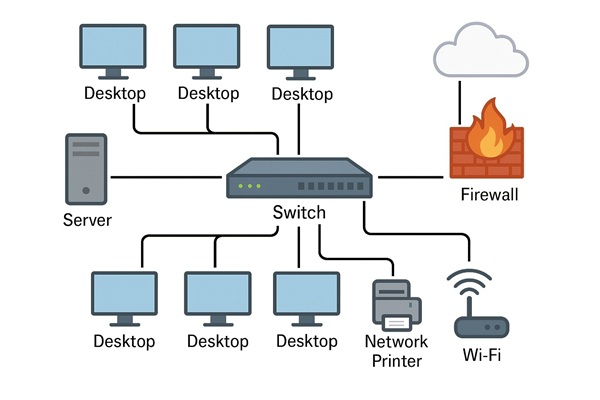
What Is a Homelab? A Fun Way to Learn Tech at Home
Keywords:
homelab, virtual, software, equipment, experience
Key Takeaway:
A homelab is like a personal tech playground.
Category Insights:
NETWORKS — Efficient networks rely on low latency, proper routing, and good
hardware.
Intro
A homelab is like a personal tech playground. It's a setup
that lets people—especially those who work in IT or love technology—learn new skills,
test software, and experiment with hardware, all from home. It can be simple or complex,
depending on what you're trying to do or learn.
Why Do People Build Homelabs?
Homelabs help people gain real-world experience with equipment they may not
get to use in school or at work. Employers often look for hands-on experience, and a
homelab is a great way to lean without the pressure of breaking something important.
They’re also great for testing ideas, trying new operating systems, learning about
servers, or even setting up personal websites or smart home projects. Some people (like
myself) will even run a small business on a homelab.
Is a Homelab Expensive?
Not necessarily. Many people build their homelabs using old or used
equipment they find on eBay, Facebook Marketplace, Goodwill, or rummage
sales. Some take pride in building powerful systems on an extremely thin
budget. Others might invest in new and high-end gear if they can afford it. There are some
people on YouTube who appear to have 50k of equipment in a homelab. (I think this is massive
overkill). Most homelab users fall somewhere in between. The primary goal is to level up
your skills and not to spend a lot of money.
What should you add first?
I like to keep it simple when starting out. I suggest handling the basic
equipment and services first. You can certainly start small and grow as your needs
change.
- Good Quality Router
- Firewall (this may be seperate or a integrated within of your router)
- DHCP services (this may be on a server or a function of your router)
- DNS services (this may be on a server or a function of your router)
- Wi-fi 6 or 7 access point (this may be seperate or a integrated within of your router)
- Port Forwarding (only if needed)
- Storage (NAS or File server)
These services can be on as few as two devices such as a Home consumer wi-fi router and a NAS. As you grow, you will likely start to separate these across several devices for greater capabilities. Once the basics are handled, then you can move on to all the other fun stuff!
Common Homelab Equipment
Every homelab is different and tailored to wherever the owner wants it to
contain. Equipment doesn't need to be new. It only needs to work. Here are some things
you might find in a homelab:
- Servers (physical or virtual)
- High-speed switches and routers
- Network-attached storage (NAS)
- Virtual machines (VMs)
- Firewall or network security devices
- Wi-Fi access points
- Single-board computers like Raspberry Pi
- Different operating systems: Windows, Linux, macOS, ChromeOS
- Media servers like Plex or JellyFin
- Home automation tools (smart lights, thermostats)
- Security camera systems
Popular Software in Homelabs
- Linux: Linux is gaining a lot of traction. Learn it, and you will be ahead most others!
- Proxmox: Used to manage virtual machines and containers.
- Kubernetes: Great for learning how cloud apps run and scale.
- Docker: Used for creating and managing software containers.
- pfSense: Custom firewall and router software.
- opnSense: Custom firewall and router software. (Open Source)
- Home Assistant: Used for automating smart devices in your home.
My Homelab Setup
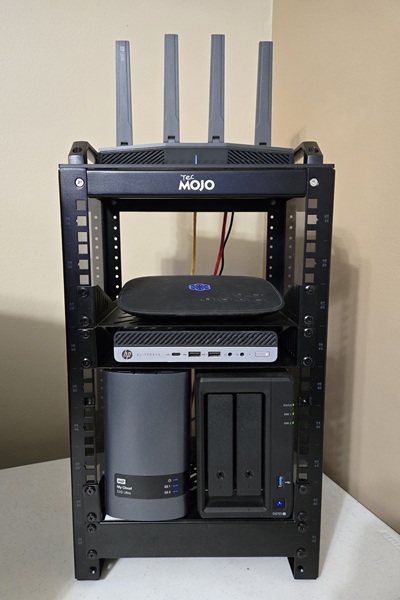
Here’s a look at what I have in my own homelab and network. I use my homelab to
run my home-based business and my wife's business.
- My daily desktop computer (custom built)
- Virtual machines (each one is a different operating system used for experimenting or for
supporting legacy clients)
Windows Server 2003, Server 2008 R2
Windows XP, Vista, Windows 7, Windows 8.1, Windows 10
Linux Mint, Ubuntu Gnome, Ubuntu Cinnamon, Raspi, Kali, Zorin, & Debian - Tec-Mojo 10" 9U mini rack system
- Two NAS units, the Synology runs Docker, Pi-Hole & Plex
- A 2.5 Gigabit network switch (Not in the rack yet)
- GL.Inet Router and Wi-Fi access points on Surf 2 Gig Fiber Internet
- Several laptops (I have 3 and the wife has 2), plus any client computers that are in for service
- A small Linux server on a headless HP mini-PC running Portainer and Pi-Hole
- A multi-camera, Eufy security camera system
- A Plex media server with hundreds of movies for household streaming
- Multiple Smart TV's with Roku devices
- Ooma VOIP telephone system
- All devices connected to a UPS units (Uninterruptible Power Supply)
I don’t use everything in my homelab every day, but it’s fun to experiment and
stay updated on new tech. The best way to learn IT is to use your skills on actual
equipment. The goal is to get some hands on experience without messing up someone elses
production environment. I’ve actually got more tech at home than some small businesses I
work with!
Many homelabs also have home automation and will use clustering, but I haven't found the
need for that at this time. There isn't anything in my homelab that demands 24/7 high
availability other than Internet and my NAS.
| Reference |
|---|
| #0062 Networks What Is a NAS? A Guide to Network Attached Storage |
Future Projects Being Considered
Automate the garage door
It has a habit of leaving itself open! Use a phone app connected to the door that can check if opened or closed. If open, automatically close the door after a specified period of time. There are kits available to adapt older garage doors for this purpose.
Additional Security Cameras
The front of the house is covered, but we need to cover the 2 rear entrances. These will likely be solar powered.
Final Thoughts
A homelab is a great way to get hands-on experience with technology. Whether you're aiming for a career in IT or just enjoy tinkering with gadgets, there’s always something new to learn. You don’t need to spend a lot—just start small, and grow your setup over time!
If your looking to start a homelab or if your interested in network services, we can help you get started.
| Reference |
|---|
| Services Network Services offered by Meyer Computer |
Frequently Asked Questions
What is a homelab?
A homelab is a personal environment where you can experiment with servers, networking,
virtualization, and other technologies at home. It’s a safe place to learn without risking
production systems.
Why would someone build a homelab?
People build homelabs to learn new skills, test software, practice IT concepts, run personal
services, or simply explore technology in a hands‑on way.
Do I need expensive hardware for a homelab?
No. Many homelabs start with older computers, small servers, or even low‑power devices like
Raspberry Pi units. You can expand later as your interests grow.
What can I run in a homelab?
Common homelab projects include virtual machines, containers, NAS storage, firewalls, media
servers, monitoring tools, and small business‑style network setups.
Is a homelab safe to run at home?
Yes, as long as you follow basic security practices. Keep systems updated, avoid exposing
unnecessary services to the internet, and use strong passwords.
Amazon Links - These are products we recommend
Meyer Computer is an Amazon Affiliate. We may earn a small commission from qualifying
purchases made through the links below.
Thank you for supporting us!
- Tecmojo 12U Network Rack, 10 inch Mini Server Rack - Black
- Tecmojo 0.5U Rack Shelf for 10" Server Rack & Cabinet
- Tecmojo 2 Pack 0.5U Horizontal Cable Manager with 3 D-Rings, Metal Rackmount Cable Organizer
-
Tecmojo 12-Port Cat6 Patch Panel, 0.5U Rack Mount Modular Panel with Keystone
Coupler
ROUTERS
- GL.iNet GL-SFT1200 Opal Travel Router, AC1200 Dual-Band Wi-Fi
- GL.iNet GL-MT3000 Beryl AX Wi-Fi 6 Travel Router
- GL.iNet GL-BE9300 Flint 3 Tri-Band Wi-Fi 7 Router
- eufy Security Video Doorbell E340, Dual Cameras
- eufy Security SoloCam S220, Solar Security Camera
- eufy Security Solar Panel (3W)
- 2-in-1 Gutter Mount for Outdoor Cameras and Solar Panels, White
- 2-in-1 Gutter Mount for Outdoor Cameras and Solar Panels, Black
- Roku Ultra | Streaming Device HD/4K/HDR/Dolby Vision with Dolby Atmos