
|
|
||||||||||
How to understand DDR4 & DDR5 Memory Timings
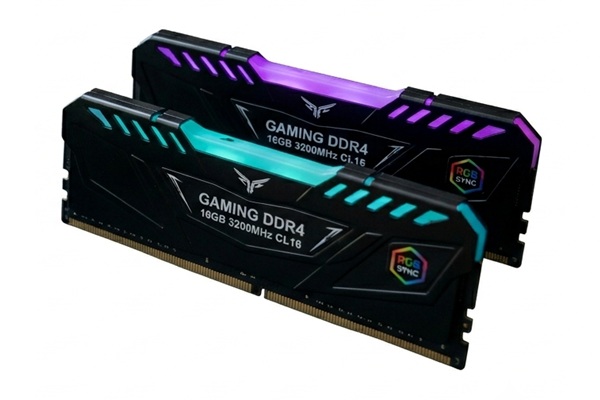
Keywords:
timings, numbers, performance, commands, computer
Key Takeaway:
If you are reading this article, your
probably a gamer who is looking for higher performance on your machine.
Category Insights:
MEMORY — Faster memory and proper capacity improve overall system
responsiveness.
BUYERS GUIDE — Buyer’s guides help you choose the right hardware and
services.
What is DDR4 / DDR5 Memory?
If you are reading this article, you're probably a gamer who is
looking for higher performance on your machine. You already own or plan on
selecting better memory. If you're a casual user then this article probably won't
apply to you.
DDR4 stands for "Double Data Rate 4", and it's a type of memory (RAM) used in modern
computers. Likewise, DDR5 stands for "Double Data Rate 5". Both are types of RAM that your
computer uses to quickly access data. The faster your RAM, the better your computer can
handle multiple tasks at once.
Why Do Memory Timings Matter?
Memory timings describe how many memory clock cycles are needed for different operations. In general, lower timing numbers mean less delay, but the numbers cannot be compared by themselves. Memory speed and timings work together.
For example, DDR4-3200 CL16 and DDR5-6000 CL30 both have an approximate CAS latency of 10 nanoseconds. DDR5 has a much higher transfer rate, even though its CL number is almost twice as high. This is why looking only at the CL number can give you the wrong impression about which memory is faster.
There is also a practical consideration: faster memory usually costs more. For a basic home or office computer used for web browsing, email, Microsoft Office and streaming video, paying extra for premium memory may provide little noticeable benefit. A gaming computer or workstation running demanding applications can make better use of faster memory.
The goal is to find a good balance between memory capacity, speed, timings and price rather than simply buying the fastest RAM available.
What Are Memory Timings?
Memory timings are a set of numbers that show how quickly the memory
responds to commands. Most of us don't need to know the technical aspect, of
these items, but it may help to have a basic definition. You might see something
like 16-18-18-38 on a DDR4 RAM stick or in the specifications.
These numbers represent:
- CAS Latency (CL): The time it takes for the memory to start sending data after a command.
- tRCD (RAS to CAS Delay): Time between row and column commands.
- tRP (Row Precharge Time): Time needed to close one memory row before opening another.
- tRAS (Active to Precharge Delay): Minimum time a row needs to stay open before it can be closed.
CAS Latency (CL)
CAS Latency (CL) is the number of memory clock cycles between the memory controller requesting data from a particular column and the RAM beginning to provide that data.
For example, a DDR4-3200 module might be rated CL16. That means the memory waits 16 clock cycles for the CAS operation.
A DDR5-6000 module might be rated CL30. Although CL30 looks much worse than CL16, DDR5-6000 runs at a much higher clock rate. The actual delay is approximately:
DDR4-3200 CL16:
16 ÷ 1600 MHz × 1,000 = 10 nanoseconds
DDR5-6000 CL30:
30 ÷ 3000 MHz × 1,000 = 10 nanoseconds
So, in this example, CL16 and CL30 have approximately the same CAS latency in actual time.
tRCD — RAS to CAS Delay
tRCD is the delay between opening a row of memory and accessing a column within that row.
Think of RAM as a giant spreadsheet. The memory controller first selects a row, then selects a column within that row to find the desired data. tRCD is the delay between those two operations.
A typical example might be:
- DDR4-3200 CL16-18-18-38
- DDR5-6000 CL30-36-36-76
In the DDR4 example, the 18 is tRCD. In the DDR5 example, the 36 is tRCD.
Again, the larger DDR5 number doesn't automatically mean it is slower. The higher operating frequency compensates for much of the difference.
tRP — Row Precharge Time
tRP is the amount of time required to close the currently active memory row before another row can be opened.
RAM doesn't simply jump from one location to another instantly. When the memory controller needs information from a different row, the current row may need to be closed, or precharged, before the new row can be activated.
Using the same examples:
- DDR4-3200 CL16-18-18-38: tRP = 18
- DDR5-6000 CL30-36-36-76: tRP = 36
A lower tRP is desirable, but once again, the number represents clock cycles, not nanoseconds.
tRAS — Active to Precharge Delay
tRAS is the minimum amount of time a row must remain active before it can be closed or precharged.
Using our examples:
- DDR4-3200 CL16-18-18-38: tRAS = 38
- DDR5-6000 CL30-36-36-76: tRAS = 76
This is why you will often see memory advertised with four numbers:
- DDR4:
3200 CL16-18-18-38 - DDR5:
6000 CL30-36-36-76
They represent:
CL – tRCD – tRP – tRAS
A Practical Comparison
| Timing | DDR4-3200 | DDR5-6000 |
|---|---|---|
| Speed | 3200 MT/s | 6000 MT/s |
| CL | 16 | 30 |
| tRCD | 18 | 36 |
| tRP | 18 | 36 |
| tRAS | 38 | 76 |
| Approx. CAS latency | 10 ns | 10 ns |
Balancing Memory Speed and Timings
When choosing DDR4 RAM, look for a reasonable balance between memory speed and timings. For example, DDR4-3200 CL16 and DDR4-3600 CL16 are both popular combinations that provide a good balance of speed and latency.
Don't assume that DDR4-3600 CL18 is automatically much faster than DDR4-3200 CL16 simply because the frequency is higher. DDR4-3600 CL18 has an approximate CAS latency of 10 nanoseconds, while DDR4-3200 CL16 is also about 10 nanoseconds.
For DDR5, a similar approach applies. A kit such as DDR5-6000 CL30 offers a combination of high transfer speed and relatively low latency. You will also find DDR5 memory with much higher speeds and higher CL numbers. Higher-end memory can be faster, but the price difference may not be worthwhile for every computer.
For most users, the goal should be balanced memory rather than the lowest possible timing or the highest possible frequency. A good-quality memory kit with sensible timings is usually a better value than paying a premium for small performance gains that may be difficult to notice during everyday use.
Don't Ignore the Rest of the Timing Numbers
Although CAS Latency (CL) gets most of the attention on a memory package, it is only one part of the equation. The other primary timings, including tRCD, tRP and tRAS, also affect how quickly the memory can perform different operations.
That's why memory is often advertised with a series of numbers such as:
DDR4-3200 CL16-18-18-38
or:
DDR5-6000 CL30-36-36-76
The first number after CL is tRCD, the second is tRP, and the final number is tRAS. These numbers describe different parts of the memory access process.
While it is useful to understand these specifications, you don't need to become an expert in memory timings to buy RAM. For most desktop users, choosing a reputable memory module with a compatible speed, adequate capacity and reasonable timings is more important than chasing the absolute lowest timing numbers.
Capacity Still Matters More Than Timings for Many Users
It is also important not to get too focused on memory timings while overlooking the amount of RAM installed in the computer.
For many home and office computers, having enough RAM can make a much bigger difference than having slightly faster RAM. A computer that is running short on memory may have to use the storage drive as temporary memory, which is considerably slower than RAM.
For example, upgrading a computer from 8GB to 16GB of RAM can provide a much more noticeable improvement in everyday multitasking than replacing 16GB of RAM with a slightly faster 16GB kit.
The same principle applies to modern systems with 32GB or more. If your computer needs additional memory, adding capacity is generally more important than spending extra money for a small improvement in memory timings.
What Should You Look For When Buying RAM?
When shopping for memory, start with capacity. Determine how much RAM your computer actually needs and what the motherboard supports. Once you have enough memory, look at the supported memory speed and timings.
For DDR4 systems, something in the range of DDR4-3200 to DDR4-3600 with reasonable timings is often a good choice, assuming your processor and motherboard support it.
For DDR5 systems, DDR5-6000 has become a popular performance-oriented choice, although the ideal speed depends on the processor, motherboard and memory controller.
Don't forget to check compatibility. DDR4 and DDR5 are not interchangeable. A motherboard designed for DDR4 requires DDR4 memory, while a DDR5 motherboard requires DDR5 memory. Even though the modules look similar, the electrical characteristics and physical keying are different.
Also remember that advertised memory speeds may depend on enabling a memory profile in the computer's firmware. Depending on the platform, this may be called XMP or EXPO. Without the appropriate profile enabled, your RAM may operate at a lower default speed.
The Bottom Line
Memory timings may seem confusing at first, but they are simply measurements of the delays involved in different memory operations. CL, tRCD, tRP and tRAS each describe a different part of the process.
The main takeaway is that lower timing numbers are generally better, but lower numbers alone do not tell you which memory is faster. You also need to consider memory speed and capacity. A higher-speed memory kit can have higher timing numbers and still provide similar or better latency.
For most people, the best choice is a balanced combination of capacity, speed, timings, compatibility and price. You don't need the most expensive RAM available to have a fast computer. Buy enough memory for what you do, choose a sensible speed and timing combination, and spend the rest of your budget where it will provide the greatest benefit.
Frequently Asked Questions
What do memory timings like 16‑18‑18‑36 actually mean?
These numbers represent how many clock cycles different memory operations take. Lower
numbers generally mean faster response time, assuming the same memory speed.
Is lower CAS latency always better?
Lower CAS latency improves responsiveness, but only when comparing memory at the same
frequency. A higher‑frequency kit with slightly higher CAS latency can still be faster
overall.
Why do DDR5 modules have higher timing numbers than DDR4?
DDR5 uses a different architecture with dual 32‑bit channels and higher frequencies. Even
though the timing numbers are larger, the increased bandwidth often results in better
real‑world performance.
Do memory timings matter for gaming?
Timings have a small but measurable impact on gaming performance, especially in CPU‑bound
titles. Frequency usually matters more, but balanced timings help reduce latency.
How do I choose between a low‑latency kit and a high‑frequency
kit?
For most users, higher frequency provides better overall performance.
Enthusiasts may prefer a balance of both, choosing kits with strong frequency and reasonably
tight timings.
Amazon Links - These are products we recommend
Meyer Computer is an Amazon Affiliate. We may earn a small commission from qualifying
purchases made through the links below.
Thank you for supporting us!
- Logitech G305 Lightspeed Wireless Gaming Mouse - Blue
- Logitech G305 Lightspeed Wireless Gaming Mouse - Black
- Keychron K10 Full Size 104 Keys Bluetooth Wireless Mechanical Gaming Keyboard
- NZXT Function - Full Size Mechanical Keyboard - Black
- Lifelong Office Chair Wheels - Black
- Lifelong Office Chair Wheels - RGB
- X-Protector GPU Support Bracket