
|
|
||||||||||
JEDEC, XMP & DOCP: Understanding Memory Standards
What's it all mean?
Keywords:
compatibility, stability, performance,
overclocking, profile
Key Takeaway:
When building or upgrading a PC, memory (RAM)
speed and compatibility play a crucial role in performance.
Category Insights:
MEMORY — Faster memory and proper capacity improve overall system
responsiveness.
BUYERS GUIDE — Buyer’s guides help you choose the right hardware and
services.
Intro
When building or upgrading a PC, memory (RAM) speed and compatibility play a
crucial role in performance. In this guide, we’ll break down the JEDEC, XMP, and DOCP
memory standards, their differences, and which one might be best for your build.
Memory packaging will be normally labeled to show that is intended for
Intel, AMD or both. It may not be labeled on the actual RAM sticks. However you can
lookup the part number on the manufacturers website to obtain this key detail.
1. JEDEC – The Industry Standard for Stability
Many PC builders have heard of XMP and DOCP, but may not have heard the term
JEDEC or did not know its definition. The JEDEC (Joint Electron Device Engineering
Council) sets the official memory speed and timing standards for DDR RAM. These
specifications ensure stability and compatibility across all systems. JEDEC is the
slowest, safest, and default option. All memory will support a range of
JEDEC-compliant speeds.
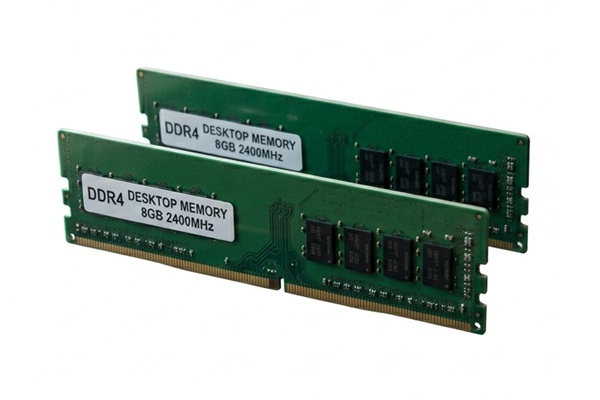
General purpose desktops used for home and office work will more than likely use JEDEC compliant memory as its cheaper. It is the most widely supported option and ensures compatibility across different systems. It has the stereotypical green appearance as shown here.
- Universal Compatibility – Works with all motherboards and CPUs.
- Stable and Reliable – No overclocking; operates at default voltages and timings.
- Lower Speeds – Sticks to conservative frequencies like DDR4-2133, DDR4-2400, DDR4-2666, DDR4-3200, or DDR5-4800.
- Downside: Lower performance due to conservative settings.
2. XMP – Intel’s Memory Overclocking Profile
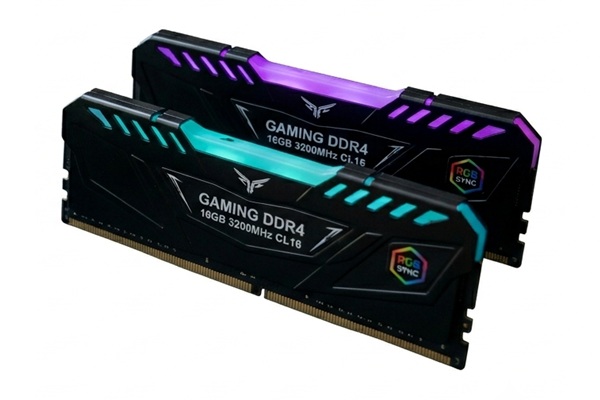
XMP (Extreme Memory Profile) is an Intel-developed technology that allows
memory modules to run at speeds higher than JEDEC standards.
- Faster Performance – Enables RAM to run at higher speeds like DDR4-3600 or DDR5-6000+.
- Pre-Tuned Settings – Easily enabled via BIOS.
- Optimized for Intel – Designed for Intel CPUs and motherboards, may work with AMD systems.
- Downside: MOST but not all boards support XMP; the memory may require higher voltage.
1. Intel XMP RAM can be used on an AMD board but it may not be fully optimized. It may revert to a slower JEDEC speed.
2. Some memory modules will support both XMP and DOCP.
3. DOCP – AMD’s Memory Overclocking Profile
DOCP (Direct OverClock Profile) allows AMD systems to use Intel XMP profiles
by interpreting and applying them through AMD BIOS settings.
- Works Like XMP – Allows AMD users to run RAM at higher speeds.
- Easy to Enable – Accessible in BIOS memory settings.
- Optimized for Ryzen CPUs – Especially effective for AMD Ryzen systems.
Which One Should You Use? (General Guide)
Speed = Money. The price for memory increases when
choosing a faster RAM kit. DDR4 will be less expensive than DDR5. However, DDR4
has been discontinued. If you have a DDR4 system, we recommend choosing DDR4-3200 if
supported by your motherboard.
| Feature | JEDEC | XMP (Intel) | DOCP (AMD) |
|---|---|---|---|
| Compatibility | All systems | Intel motherboards | AMD motherboards |
| Speed | Standard (e.g., DDR4-3200) | Higher (e.g., DDR4-3600) | Higher (e.g., DDR4-3600) |
| Stability | Most stable | May need extra voltage | May need extra tuning |
| Overclocking | No | Yes | Yes |
| Ease of Use | No settings required | Enabled via BIOS | Enabled via BIOS |
All JEDEC standards for DDR4 and DD5 (Detailed)
Memory packaging will be normally labeled to show that is intended for
Intel, AMD or both. It may not be labeled on the actual RAM sticks. However you can
lookup the part number on the manufacturers website to obtain this key detail.
| Memory Type | JEDEC Standard | Transfer Rate | PC Rating | Default Voltage |
|---|---|---|---|---|
| DDR4 | DDR4-1600 | 1600 MT/s | PC4-12800 | 1.20V |
| DDR4 | DDR4-1866 | 1866 MT/s | PC4-14900 | 1.20V |
| DDR4 | DDR4-2133 | 2133 MT/s | PC4-17000 | 1.20V |
| DDR4 | DDR4-2400 | 2400 MT/s | PC4-19200 | 1.20V |
| DDR4 | DDR4-2666 | 2666 MT/s | PC4-21300 | 1.20V |
| DDR4 | DDR4-2933 | 2933 MT/s | PC4-23466 | 1.20V |
| DDR4 | DDR4-3200 | 3200 MT/s | PC4-25600 | 1.20V |
| DDR5 | DDR5-4800 | 4800 MT/s | PC5-38400 | 1.10V |
| DDR5 | DDR5-5200 | 5200 MT/s | PC5-41600 | 1.10V |
| DDR5 | DDR5-5600 | 5600 MT/s | PC5-44800 | 1.10V |
| DDR5 | DDR5-6000 | 6000 MT/s | PC5-48000 | 1.10V |
| DDR5 | DDR5-6400 | 6400 MT/s | PC5-51200 | 1.10V |
| DDR5 | DDR5-6800 | 6800 MT/s | PC5-54400 | 1.10V |
| DDR5 | DDR5-7200 | 7200 MT/s | PC5-57600 | 1.10V |
| DDR5 | DDR5-7600 | 7600 MT/s | PC5-60800 | 1.10V |
| DDR5 | DDR5-8000 | 8000 MT/s | PC5-64000 | 1.10V |
Final Recommendation:
- Use JEDEC if stability is your top priority (e.g., business or workstation builds).
- Enable XMP if you have an Intel CPU and want better performance for advanced users, gaming or content creation.
- Use DOCP for AMD Ryzen systems to get the most from high-speed RAM also for advanced users, gaming or content creation.
Always run a memory stability test (like MemTest86) after enabling XMP or DOCP to ensure your system remains stable.
Final Thoughts
Choosing the right memory profile can significantly boost your PC’s
performance without complex manual overclocking. Whether you're focused on
stability with JEDEC, speed with XMP, or AMD compatibility with DOCP,
understanding these profiles will help you make an informed decision for your
next build.
Frequently Asked Questions
What is JEDEC memory?
JEDEC memory follows official industry standards for speed, voltage and timings. It is the
baseline specification that guarantees broad compatibility and stability.
What is XMP on RAM?
XMP (Extreme Memory Profile) is an Intel technology that stores overclocked memory settings
in the RAM module, allowing the BIOS to apply higher speeds and tighter timings with a
single option.
What is DOCP and how is it different from XMP?
DOCP is AMD’s way of reading XMP‑style profiles on non‑Intel systems. It translates those
settings so Ryzen motherboards can run memory at the advertised speeds.
Is it safe to enable XMP or DOCP?
On quality motherboards with good power delivery, XMP or DOCP is generally safe. However, it
still counts as overclocking, so stability should be tested and very cheap systems may
struggle.
Do I need JEDEC or XMP for a reliable system?
JEDEC speeds are the safest choice for maximum compatibility. XMP or DOCP can provide extra
performance, but stability depends on the CPU, motherboard and RAM quality.
Amazon Links - These are products we recommend
Meyer Computer is an Amazon Affiliate. We may earn a small commission from qualifying
purchases made through the links below.
Thank you for supporting us!
- Logitech G305 Lightspeed Wireless Gaming Mouse - Blue
- Logitech G305 Lightspeed Wireless Gaming Mouse - Black
- Keychron K10 Full Size 104 Keys Bluetooth Wireless Mechanical Gaming Keyboard
- NZXT Function - Full Size Mechanical Keyboard - Black
- Lifelong Office Chair Wheels - Black
- Lifelong Office Chair Wheels - RGB
- X-Protector GPU Support Bracket