|
|
||||||||||
Spinning Rust (Hard-Drives) vs SSD
Each has its purpose
Keywords:
spinning, mechanical, harddrive, power, computer
Key Takeaway:
Computers over a certain age will have a
mechanical harddrive.
Category Insights:
HARDDRIVES — Hard drives store your data; reliability and backups are
critical.
Old School / New School
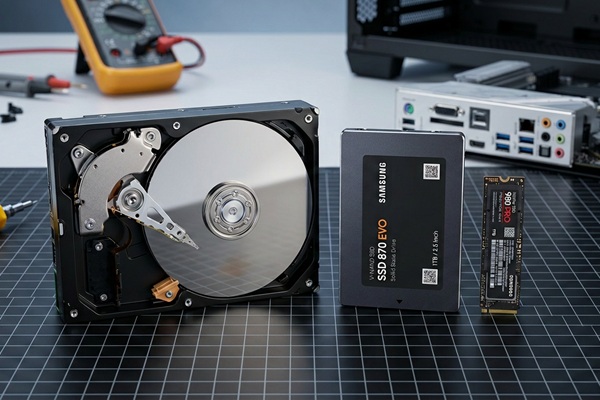
Computers over a certain age will have a mechanical harddrive. It
involves one or more spinning platters and a read/write head on the end of an arm.
If you open one, it looks like an old record player on the inside. The drive motor
will spin the platter into position and the head will read a single block of data.
As it continues spinning, each rotation allows it to read another block. It does
this over and over as needed. A file can be a single block or thousands of blocks.
This is a slow process and it isn't fast enough to keep up with today's modern
processors. The drives have motors and consume more power. They are sensitive to
movement such as drops and sudden impacts. It's possible for large magnets can
scramble the data. The drives are hermetically sealed (air tight). If air gets
inside, they can rust from the humidity. Hence the term 'spinning rust'. Any
defects on the platters will cause retries, which are perceived as a slow drive or
will cause data errors. Common drive capacities within the last 5-7 years are are
500G and 1TB.
New Tech
A Solid State Drive (SSD) is newer technology with many advantages. An
SSD is comprised entirely of computer chips. It has no moving parts. It's physically
smaller and uses less power. Less power consumption means that laptops batteries
will last longer. There is nothing magnetic to get scrambled. All computers
manufactured today use an SSD as the drive for the main operating system. Common
drive capacities within the last 5-7 years are are 500G, 1TB and 2TB. An SSD is
still more expensive than a spinning harddrive, but the speed benefits far outweigh
the cost. This represents a huge improvement over spinning drives.
Sata SSD Drives

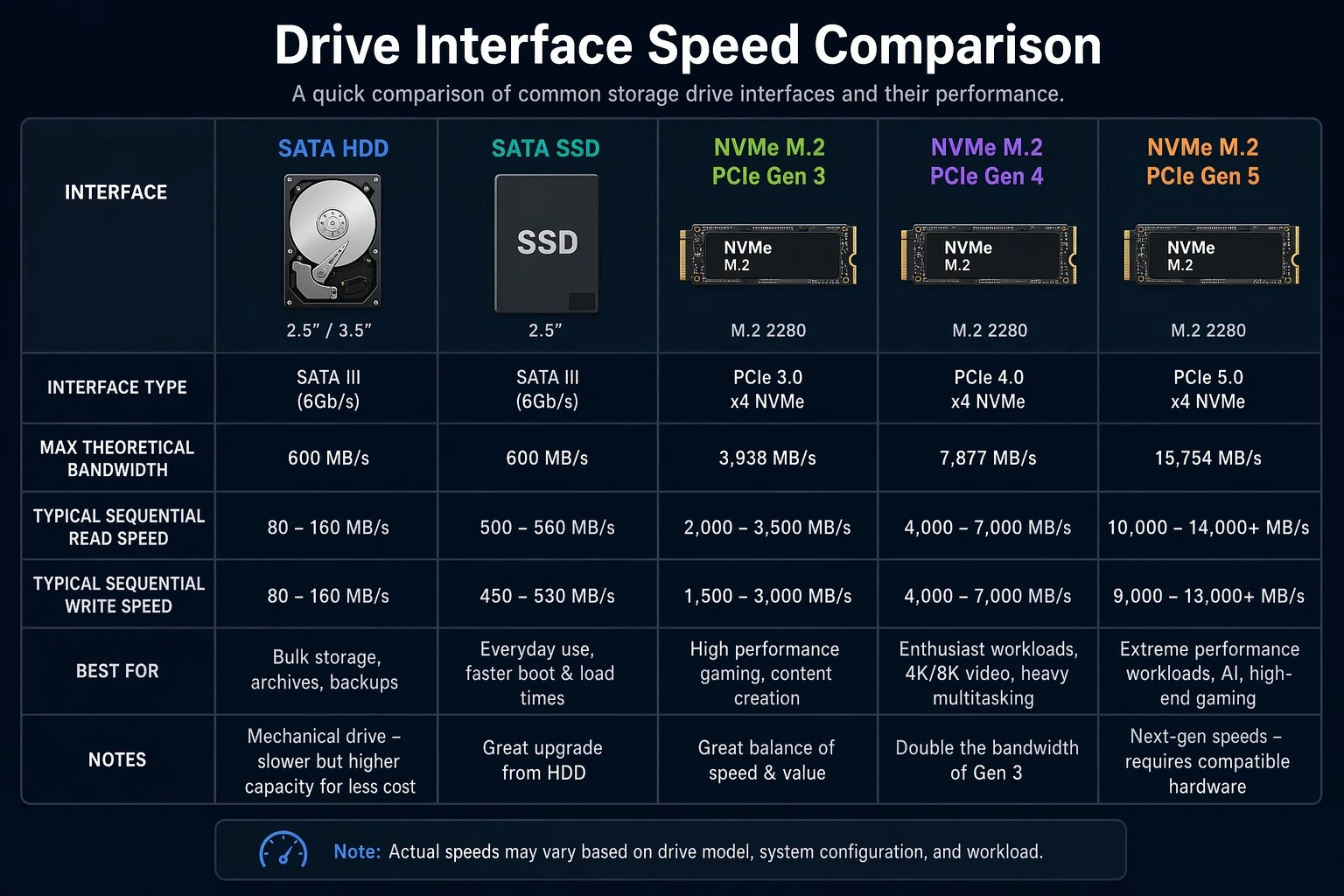
SSD's come mainly in 2 forms for home computers. A SATA SSD is intended to be used when
upgrading an older desktop or laptop computer that originally had a mechanical / spinning
drive. They are the exact same size as a 2.5 inch laptop harddrive. It can connect to the
same connector and uses the same SATA interface. It's the intermediate option to upgrade a
computer that lacks an NVME port. Using one in a desktop will normally require a proper
mounting bracket.
NVME Drives

A NVME drive is a different type of SSD. It used the same general technology but uses a
different connection found directly on the motherboard. This connection ties directly into
the PCIE bus It's capable of even greater speeds than the SSD.
Mechanical Drives (A.K.A. Spinning Rust)

There is still a use case for mechanical drives. New high capacity drives are still
being developed. They are being used to provide MASS storage at a very economical
price. At the time of this article, there are spinning drives that will hold as much
as 30TB. This is great option for files that are less frequently used.
How do they compare?