
|
|
||||||||||
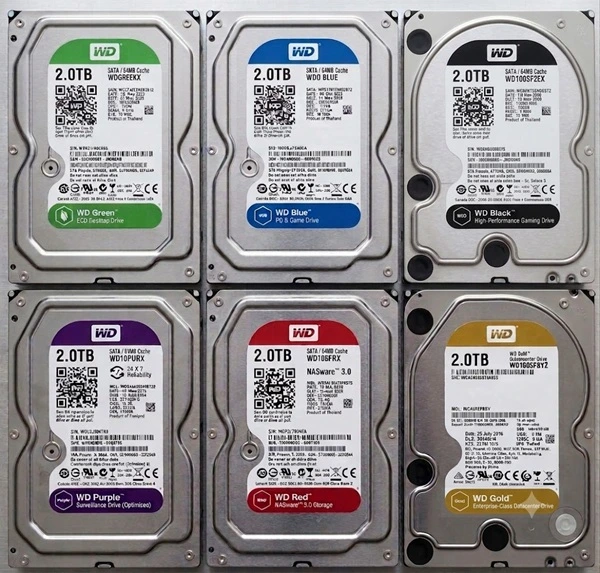
What Do WD Hard Drive Colors Mean? A Simple Guide
Keywords:
color, digital, surveillance, storage, vibration
Key Takeaway:
When you're buying a Western Digital hard
drive, you might notice they come in different colors—like Green, Blue, Red, and
more.
Category Insights:
BUYERS GUIDE — Buyer’s guides help you choose the right hardware and
services.
HARDDRIVES — Hard drives store your data; reliability and backups are
critical.
Overview
When you're buying a Western Digital hard drive, you might notice they come
in different colors—like Green, Blue, Red, and more. These colors aren't just for
looks. They tell you what each drive is best used for. Whether you’re building a
gaming PC, setting up a server, or installing surveillance cameras, choosing the
right drive can make a big difference. These colors have been used primarily by
Western Digital. Seagate has adopted a somewhat different color scheme for their
drives. To my knowledge, the other manufacturers have NOT adopted the color branding
in this manner.
Understanding Drive Types
Both traditional spinning hard drives (HDDs) and solid-state drives (SSDs)
can have these color labels. Each color is designed for a specific type of use, and
knowing the difference can help you avoid performance issues or hardware failures down
the road.
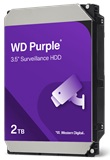
The WD Red drives are available as both SMR and CMR. We do NOT recommend SMR drives as they can fail prematurely after sectors are re-written too many times. This was a big issue a while back and there may still be some in the supply chain. The WD Red CMR drives work fine.
Blue Drives: A good all-around choice for everyday computing. Blue drives are affordable and often found in brand-name systems like Dell and HP. They’re great for students and home users. This would be considered the value option.
Most color-coded drives are HDDs, but some SSDs use the same labeling. SSDs are faster and quieter than HDDs but can be more expensive. For best results, pair a fast SSD (for your operating system) with a large HDD (for mass storage of your less frequently used files).
In Summary
The color of a Western Digital hard drive gives you a quick way to identify its intended use. Whether you need speed, reliability for a NAS, or a drive that can handle constant recording, there’s a color-coded option to fit your needs. Just remember to choose the right one for your specific use case to get the best performance and longevity out of your drive!
Frequently Asked Questions
What is the difference between WD Blue and WD Black drives?
WD Blue drives are designed for everyday computing and value. WD Black drives are optimized
for higher performance and are a better choice for gaming, content creation, and demanding
workloads.
What is a WD Red drive used for?
WD Red drives are designed for NAS (Network Attached Storage) systems. They are built to
handle continuous operation, vibration from multiple drives, and RAID environments.
Can I use a WD Red drive in a regular desktop computer?
Yes. A WD Red drive will work in a desktop computer, but it is optimized for NAS
applications and is usually more expensive than a standard desktop drive.
What is the difference between SMR and CMR hard drives?
CMR (Conventional Magnetic Recording) generally provides better performance and reliability
for heavy workloads. SMR (Shingled Magnetic Recording) can be slower when rewriting large
amounts of data and may not be suitable for some NAS and RAID environments.
What are WD Purple drives used for?
WD Purple drives are designed for video surveillance systems. They are built to record video
continuously and handle frequent overwriting without excessive wear.
Should I choose an SSD or HDD?
SSDs are significantly faster and quieter, making them ideal for operating systems and
applications. HDDs offer more storage capacity per dollar and are often used for large file
collections and backups.
What is a WD Gold drive?
WD Gold drives are enterprise-class drives designed for servers and data centers. They are
built for heavy workloads, high reliability, and around-the-clock operation.
Which Western Digital drive is best for home users?
For most home users, a WD Blue drive offers the best balance of performance, reliability,
and cost. Users with specialized needs may be better served by Black, Red, or Purple models.
Amazon Links - These are products we recommend
Meyer Computer is an Amazon Affiliate. We may earn a small commission from qualifying purchases made through the links below.Thank you for supporting us!