
|
|
||||||||||
NVIDIA Graphics Card Numbers Explained: What Do They Mean?
It's easy - Honest!
Keywords:
graphics, ray-tracing, generation, driver,
editing
Key Takeaway:
If you're building a gaming PC or upgrading
your graphics card, you’ve probably seen names like RTX 3080 Ti or GTX 1660
Super .
Category Insights:
BUYERS GUIDE — Buyer’s guides help you choose the right hardware and
services.
GAMING — Gaming performance depends on GPU, CPU, memory, and display
quality.
Overview
If you're building a gaming PC or upgrading your graphics card, you’ve probably seen
names like RTX 3080 Ti or GTX 1660 Super. But what
do all these numbers and letters mean? In this post, we’ll break down how NVIDIA
names its graphics cards so you can understand the differences and choose the right
one.
The Basics of the NVIDIA Naming System
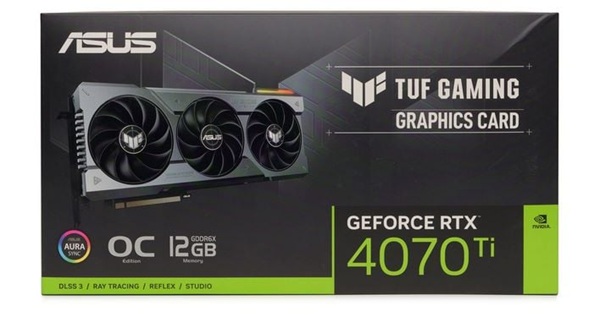
Breakdown:
NVIDIA graphics card names follow this basic format:
GeForce + GTX/RTX + Series Number + Model Number + Suffix (optional) + Misc
For example: RTX 4070 Ti OC Asus is the brand and
TUF is the product line.
GTX vs RTX
- GTX: Older series of NVIDIA cards. Great for general gaming but lacks newer features like ray tracing.
- RTX: Newer series that includes ray-tracing and AI features for more realistic graphics and faster performance.
What is Ray-Tracing?
Ray-tracing is a rendering technique that simulates how light behaves in the real world by tracing the path of individual light rays as they bounce, reflect, and refract off objects in a 3D scene to create incredibly realistic lighting, shadows, and reflections in digital images and games. Instead of faking light (rasterization), it literally follows light from the camera's perspective into the scene and back to a light source, resulting in photorealistic visuals but requiring significant computing power.Understanding the Series and Model Numbers
Let’s take a look at an example: RTX 3080
- 30 = The generation or series (in this case, the 3000 series).
- 80 = The model tier. Higher numbers mean better performance (e.g., 60 is mid-range, 80 is high-end).
Here are some recent NVIDIA generations:
- 900 series (e.g., GTX 970)
Driver updates are discontinued for the 900 series. - 10 series (e.g., GTX 1060)
Driver updates are discontinued for the 10 series. - 16 series (e.g., GTX 1660 Super)
- 20 series (e.g., RTX 2060, RTX 2080 Ti)
- 30 series (e.g., RTX 3060, RTX 3080)
A recent Steam hardware survey claims the average gamer is in the 3000 series. - 40 series (e.g., RTX 4070, RTX 4090)
- 50 series (e.g., RTX 5070, RTX 5090)
- 60 series These are on the horizon!
What Do the Suffixes Mean?
NVIDIA adds suffixes to help show special versions of a card. Here are the most
common ones:
- Ti: A more powerful in-between version of the base card. For example, the RTX 3070 Ti is faster than the RTX 3070 but falls short of the 3080.
- Super: Another upgrade version, typically found in the GTX 16 and RTX 20 series. Slightly faster than the non-Super version.
- M: Used in older mobile GPUs for laptops (e.g., GTX 960M).
- Max-Q: Found in laptops, optimized for quieter performance and better battery life.
Some manufactures will also add their own suffixes such as EVGA's FTW cards. It means 'For the Win'. Other examples may include OC (factory overclocked), Windforce (better fans) or Ultra (this can be anything). The definitions MAY indicate some type of performance enhancement to the base model and may only be a marketing ploy. Do your research before making a purchase.
Performance Levels by Model Number
Generally, higher model numbers mean better performance and higher cost:
- 50 or lower: Entry-level (good for casual use, light gaming)
- 60: Mid-range (good for 1080p gaming and light 1440p)
- 70: Upper mid-range (good for 1440p gaming)
- 80: High-end (great for 1440p/4K gaming)
- 90: Enthusiast/flagship (best for 4K and heavy workloads)
Got it? Here's another example breakdown
Let’s break down RTX 4080 Ti:
- RTX = Has ray-tracing and AI features
- 40 = 4000 series (previous generation)
- 80 = High-end performance level
- Ti = More powerful than the standard 4080 but short of the 4090.
Choosing the Right Card for You
- If you’re gaming at 1080p and want good performance for less money, a card like
the RTX 3060 or GTX 1660 Super is great.
- For 1440p or higher frame rates, consider the RTX 4070 or
above.
- For 4K gaming or creative work like video editing, the RTX 4080
or RTX 4090 is ideal.
- The higher the number goes, the performance and the price go up.
If you're into competitive eSports games like Fortnite, Valorant, or Apex Legends, a higher frame rate (FPS) can give you a smoother and faster gaming experience. These types of games benefit from powerful graphics cards because they run at 120, 144, or even 240 frames per second on high-refresh-rate monitors. To reach these high frame rates, you'll need a mid-to-high-end GPU such as an RTX 4070 or better. A lower end or older card might bottleneck your system and cause lag or stuttering, which can hurt your performance in fast-paced matches.
If your interested in pushing the limits of your card, you might try
overclocking. The method discussed in the article below will show you how!
Reference:
#0084 Gaming Buyers Guide Overclock any video card with this easy method
Conclusion
Now that you understand how NVIDIA names its graphics cards, you can shop smarter
and get the right GPU for your needs. Whether you're gaming, editing videos, or
building your first PC, knowing what each number and suffix means makes a big
difference.
Frequently Asked Questions
What do the numbers in NVIDIA GPU names mean?
The first digit represents the GPU generation, the second digit indicates performance tier,
and the suffix (Ti, Super, etc.) shows enhanced versions of the base model.
Is a higher NVIDIA model number always better?
Not always. A newer generation (e.g., 50‑series) can outperform an older high‑tier card
(e.g., 80‑series), depending on architecture improvements.
What does the “Ti” label mean on NVIDIA cards?
“Ti” stands for “Titanium” and indicates a more powerful version of the base model, usually
with more CUDA cores and higher performance.
How do I compare two NVIDIA GPUs quickly?
Compare generation first, then tier. For example, a 4070 generally beats a 3070 because it’s
a newer generation with architectural improvements.
Does the generation number matter more than the tier?
For most users, yes. Newer generations bring better efficiency, ray tracing performance, and
DLSS improvements.
Amazon Links - These are products we recommend
Meyer Computer is an Amazon Affiliate. We may earn a small commission from qualifying
purchases made through the links below.
Thank you for supporting us!
- ARCTIC MX-4 (8 g) - Premium Performance Thermal Paste
- ARCTIC MX-6 (8 g) - Ultimate Performance Thermal Paste
- ARCTIC TP-3: Premium Performance Thermal Pad, 100 x 100 x 1.0 mm
- Logitech G305 Lightspeed Wireless Gaming Mouse - Blue
- Logitech G305 Lightspeed Wireless Gaming Mouse - Black
- Keychron K10 Full Size 104 Keys Bluetooth Wireless Mechanical Gaming Keyboard
- NZXT Function - Full Size Mechanical Keyboard - Black
- Lifelong Office Chair Wheels - Black
- Lifelong Office Chair Wheels - RGB
- X-Protector GPU Support Bracket